1
CAPP User Guide
Requesting Batch Compliance Reports for Specific Students
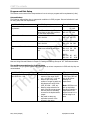
The Batch compliance process is for when you wish to run and print compliances for multiple programs
and catalog terms for many students.
If you wish to run a multiple program Compliances for many students, there are three basic steps:
I.
II.
III.
I.
Enter the compliance requests via SMRQCMP.
Get sequence number for SMRBCMP.
Submit the Degree Audit Batch Compliance job from BASIS Jobs Menu.
Entering Compliance Requests
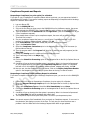
You will need to enter all the requests and submit them as one job.
1.
2.
3.
4.
5.
6.
7.
8.
9.
10.
11.
12.
13.
14.
15.
16.
17.
II.
Log onto Banner SIS.
Go to the SMARQCM form.
If this is the first time you have gone to the SMARQCM form for this Banner session, the
screen will first display the SOADEST form. Press the Esc key and it will bring up the
SMARQCM form.
Type in the student’s id the Student Id field and Page Down. (Click on the Search icon to
get a list of compliance requests).
If the student does not have a prior compliance request, the cursor will go to the
Evaluation Term field. Go to step 8.
If a prior compliance request has been run, you will get a ‘Compliance has been run for this
request. No updates or deletes allowed’ message. Click Ok.
Do an Insert Record if the student already has previous compliance requests.
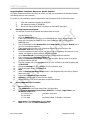
Type in the term in the Evaluation Term field.
Select the Compliance Curriculum option in the Navigation Bar on the left of the screen
(or Options Menu at the top).
Type the program code in the Program field (do a list of values to see valid programs) and
do Next Field.
Change the Catalog term if it is different from the evaluation term.
Type a valid major code in the Major field.
Save.
Select the Request Hardcopy Output option in the Navigation Bar to the left (or Options
Menu at the top).
Type a valid Compliance Type and Save.
Rollback to the key block to enter the next request.
Repeat steps 4-16 until all the compliance requests are entered.
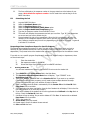
Getting SMRBCMP Sequence Number
18.
19.
20.
Exit the SMARQCM form.
Type SMRBCMP in the Direct Access field in the Main Menu.
The Process Submission Control Form (GJAPCTL) will display. Page Down to the
Parameter Values block:
01 Process Term
(evaluation term code)
02 Run Mode
C
17 Sort Order
(N=Student Name, Z=Zipcode, P=Program)
21.
Page Down to the Submission block and Save.
Note: Do not check the Save Parameters box.
Mary Theis (Sample)
12
05/18/2012 5:42 PM