1
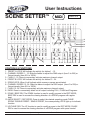
12. PAGE SELECT: Press to change between pages of scenes.
13. DELETE REV ONE: Press and hold this button then press any FLASH 13 -24 to reverse
direction of Scene that is running.
14. EXIT: Press to select ADD or KILL mode
15. INSERT / % OR 0-255: Press to select LCD DISPLAY
16. RECORD: Press to record output step by step.
17. EXIT / ALL REV: Press to reverse chasing direction of programs
18. PARK: In CHASE SCENE mode press to select SINGLE or MIX mode
19. HOLD: Press to maintain all output.
20. AUDIO: Press for MUSIC chase.
21. STEP: Press to step to next SCENE.
22. AUDIO LEVEL: Adjust sensitivity of AUDIO input
23. MASTER SLIDER A: Adjusts PRESET A output.
24. BLIND: Press to activate the BLIND function in CHASE SCENE MODE. This locks in the
values of the CHANNEL output until you press BLIND again. - Full Output.
25. HOME: Press to activate HOME in CHASE SCENE MODE this
26. MASTER SLIDER B: Adjusts PRESET B output.
27. TAP SYNC: In RUN MODE the interval of two taps determines the chase speed.
28. FADE: SLIDER. Move to adjust FADE TIME.
29. FULL-ON: Use to Max output of CHANNELS
30. SPEED: Move to adjust speed of chase
31. BLACK OUT: Turns off all functions and output.
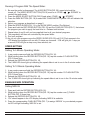
Rear Panel Connections;
33
32
DC INPUT
34
37
36
35
DMX OUT
MIDI
1:GND
1
2
2:DATA 3:DATA +
-
1:GND
39
REMOTE
REMOTE
19
2:DATA +
3:DATA -
+
DC 12V-20V
500mA min.
38
1/4” STEREO JACK
LINE INPUT
THRU
OUT
IN
3
DMX POLARITY SELECT
100 mV - 1VP-P
FULL ON
BLACK OUT
GROUND
32. DC INPUT: DC 12-20v, 500 mA min.
33. MIDI THRU: Used to transmit MIDI data received from the MIDI IN (FIG. 4) connector
to a sperate MIDI component.
34. MIDI OUT: Used to transmit the SCENE SETTER’S MIDI DATA to a MIDI fixture or MIDI
power pack.
35. MIDI IN: Used to receive MIDI incoming MIDI data from a MIDI controller or
sequencer.
36. DMX OUT: Used to send DMX data to DMX Fixture or DMX power pack.
37. DMX POLARITY SELECTOR: Used to select DMX polarity output signal.
38. AUDIO INPUT: Enables the SCENE SETTER to run sound active, signal must range
39. REMOTE INPUT: BLACK OUT and FULL ON may be controlled by a remote using a
standard 1/4 stereo jack.
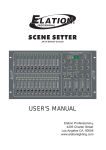
Specifications are subject to change without notice! - Scene Setter User Manual page 2