1
DATA SHEET PTZ Optics UVC Camera Control Specifications & Diagrams
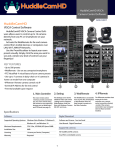
1. PTZOptics UVC Controller
1
Camera Control Interface
2. Pan Tilt Zoom Buttons
Buttons for Pan and Tilt
in 8 directions.
3. Zoom in/out buttons
2
Ability to zoom in and out.
4. Focus
10. Preset Buttons
Quickly set and call presets by
first selecting the number and
then pressing set or call.
11. Web Control
Quickly turn on/off Web Control
Access on your network.
12. IP Control
Quickly turn on/off IP Control
Access on your network.
13. Preset Scanning
PTZ Controls
Fine tuning of camera
Provides preset touring capabilities.
PTZ controls.
14. Hide
Video Preview
Quickly hide entire application
Shows live video preview from
in quick start bar.
connected PTZOptics camera.
15. Keyboard Control
Camera Drop down
Turn on PTZ camera control via
Provides access to multiple
USB keyboard.
cameras
16. About
PTZVisual
Provides IP information for Web/IP Remotes.
Opens PresetVisualizer in new
17.
Exit
window.
Quit program.
Current Preset / Preset Name
Allows selection of preset. Also
area for naming current preset.
Near/Far focus buttons.
5.
3
6.
4
7.
5
8.
9.
6
Keyboard Controls available when activated.
7
8
9
10
11
12
PresetVisualizer
Camera Control Interface
13
14
15
16
17
P
T
Z
OPTICS