1
Quick Guide
Step 1:
A.
B.
C.
D.
E.
F.
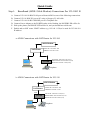
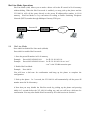
Broadband (ADSL/Cable Modem) Connections For VG-100/110
Connect VG-100/110 RJ45 LAN port to Router/ADSL as one of the following connections.
Connect VG-110 RJ45 PC port to PC using a Category 5 LAN cable.
Connect VG-100/110 RJ11 PHONE port to a Telephone Set.
Connect Power Adaptor to the POWER outlet. After flashing, the POWER LED will be lit.
Pick up the phone, the PHONE LED will be lit, and you should hear a dial tone.
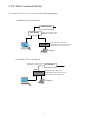
Enable and set NAT router “DMZ” address (e.g. 192.168.1.150) to be used for VG-100/110
IP address.
a. ADSL Connections with NAT Router for VG-100
ADSL Modem
NAT Router
Router IP: 192.168.1.254
DMZ IP: 192.168.1.150
VG-100
PC
VG100 IP: 192.168.1.150 (#11)
Subnet Mask: 255.255.255.0 (#12)
Router IP: 192.168.1.254 (#13)
Telephone
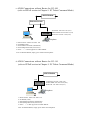
b. ADSL Connections with NAT Router for VG-110
ADSL Modem
NAT Router
LAN
VG-110
PC
Router IP: 192.168.1.254
DMZ IP: 192.168.1.150
VG110 IP: 192.168.1.150 (#11)
Subnet Mask: 255.255.255.0 (#12)
Router IP: 192.168.1.254 (#13)
Telephone