1
Table of Contents
Intellectual Property ________________________________________________________ 2
Warranty _________________________________________________________________ 2
Contacts _________________________________________________________________ 2
Disclaimer ________________________________________________________________ 2
Revision History ___________________________________________________________ 2
List of Figures _____________________________________________________________ 6
List of Tables _____________________________________________________________ 7
1: Using This Guide
8
Purpose and Audience ______________________________________________________ 8
Summary of Chapters _______________________________________________________ 8
Additional Documentation ____________________________________________________ 8
2: Introduction
10
Key Features _____________________________________________________________ 10
Protocol Support
_________________________________________________________ 12
Troubleshooting Capabilities _________________________________________________ 12
Configuration Methods _____________________________________________________ 12
Addresses and Port Numbers ________________________________________________ 12
Hardware Address _____________________________________________________ 12
IP Address ___________________________________________________________ 12
Port Numbers _________________________________________________________ 12
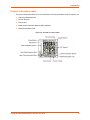
Product Information Label ___________________________________________________ 13
3: Configuration Using Web Manager
14
Accessing Web Manager ___________________________________________________ 14
Status Page ______________________________________________________________ 15
Web Manager Components _________________________________________________ 16
Navigating Web Manager ___________________________________________________ 16
4: Network Settings
18
Network 1 Interface (ap0) Configuration ________________________________________ 18
To Configure Network 1 Interface Settings ___________________________________ 18
To View Network 1 Interface Status ________________________________________ 19
Network 1 (ap0) Link Settings ________________________________________________ 19
To Configure Network 1 Link Settings ______________________________________ 19
To View Network 1 Link Status ____________________________________________ 20
Network 2 (wlan0) Interface Configuration ______________________________________ 20
To Configure Network 2 Interface Settings ___________________________________ 21
xPico® Wi-Fi® Embedded Device Server User Guide
3