1
AT Command Set V2.00
Inventek Systems, Inc.
DOC-UM-20035-1.1
User Manual
eS-WiFi Module
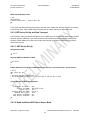
4.8.5. ‘P4’ Set Transport Remote Port Number
Set Transport Remote Port Number allows the user to define the port number for a Transport Server on
the network that the eS-WiFi module will use to communications with that server.
Input range for Local Port is 0 to 65535.
Usage: P4=<Local Port><CR>
Default Value: P4=5025
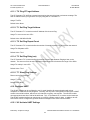
4.8.6. ‘P5’ Stop/Start Transport Server
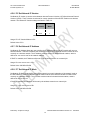
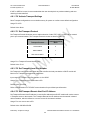
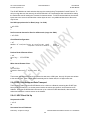
Stop/Start Transport Server is used to stop or start the eS-WiFi module’s Transport Server mode. The AT
Command ‘P1’ is used to select between TCP, UDP or UDP Lite server protocols. The Transport Server
modes are listed in Table 4.7.
Transport Server
Transport Server
Mode
Server Disable
0
Server Enable
1
Figure 4.7: Transport Server Modes
Usage: P5=<Transport Server Modes><CR>
Default Value: P5=0
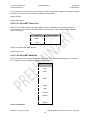
4.8.7. ‘P6’ Stop/Start Transport Client
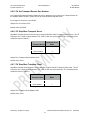
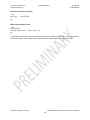
Stop/Start Transport Client is used to stop or start the eS-WiFi module’s Transport Client mode. The AT
Command ‘P1’ is used to select between TCP, UDP or UDP Lite server protocols. The Transport Server
modes are listed in Table 4.8.
Transport Client
Transport Client
Mode
Client Disable
0
Client Enable
1
Figure 4.8: Transport Server Mode
Usage: P6=<Transport Client Modes><CR>
Default Value: P5=0
Preliminary - Subject to change
eS-WiFi Module User Manual Version v1.1 12/15/2011
21