1
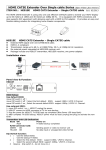
Installation view:
HE01S (HE01ST+HE01SR)
HE01SE (HE01ST+HE01SER)
HE01SL (HE01ST+HE01SLR)
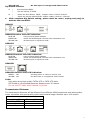
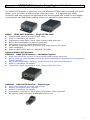
Panel view & Function:
HE01ST
EDID Setup:
Use default EDID:
move DIP switch 1 off ↑
move DIP switch 2 off ↑ Select the first default EDID: support 1080i / LPCM 2 Channel.
move DIP switch 2 on ↓ Select the second default EDID: support 1080p / LPCM 5.1 Channel.
Use external EDID:
1. move DIP switch 1 on ↓, HE01ST unplug the power.
2. HE01ST connect to HDMI connector of TV for auto backup.
3. Plug the power for HE01ST, TV EDID back up completed (Blue Power LED keep flash)
4. After complete TV EDID backup, HE01ST power must be reset (unplug and plug) to activate
the new EDID.
Transmitter Unit LED Indication:
BLUE ON
Flash
Power on
TV EDID backup completed
RJ45 Connector LED:
GREEN
ON
Sending power or video to receiver unit
2