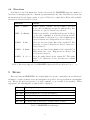
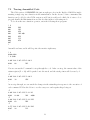
1
the object code, and test it on the Pom1 simulator4 and my Replica 1. Although the latest version
of KRUSADER supports the 65C02, it contains only 6502 code itself, and this manual will cover
the 6502 features first, saving a discussion of the 65C02 enhancements until section 6. Addresses
quoted in this manual will be for the high RAM version of the code, with the ROM version values
following in brackets, but these values are easily offset for any particular starting address.
2
Sample Session
The best way to give a quick overview of the system and its operation is to work through a
couple of simple examples. First thing is to load the program, and once loaded run it by typing
7100R(F000R). At this point you will be presented with a brief message showing the version of
the assembler you are running, followed by the shell prompt ? . Type N to enter a new program,
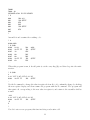
and enter the code shown below. The column layout is important, with the source organised in
fields. After the current line number is printed by the editor, the next 6 characters are the label
field, then after a space there is the 3 character mnemonic field, then after a space a 14 character
arguments field, and finally a comments field of maximum 10 characters. Hitting tab or space will
automatically progress you to the next field, and to finish entering code, hit the escape key (hit
return first though, or you will lose the current line). If you make an error typing a line, hitting
backspace will return you to the start of the line (there is no true backspace on the Apple 1, and I
have chosen not to implement the underscore-as-backspace hack used in the Apple 1 monitor and
Apple 1 BASIC since it confuses the syntactically important column layout). If you only notice
an error after hitting return and need to change a line, type E nnn, where nnn is the line number
in question (it is not necessary to enter any leading zeroes). If you missed a line out altogether,
type I nnn to insert at line nnn.
? N
000
001 LOOP
002
003
004
005
006
007<esc>
LDA
JSR
CLC
ADC
CMP
BNE
RTS
#’A’
$FFEF
#$1
#’Z’+1
LOOP
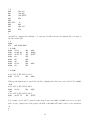
When you have finished entering the source, type L to list the code, and then A to assemble it. You
should see the assembler output 0300-030C, indicating the target memory locations used by the
assembled code. Any errors detected in the code will be displayed at this point, and can be fixed
using either the I and E commands described above, or the X nnn mmm command for deleting
a range of lines (the second argument mmm is optional). Once the code has been successfully
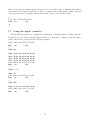
assembled, run it by typing R $300. The program will run and output the string
ABCDEFGHIJKLMNOPQRSTUVWXYZ
4
The original is at http://www.chez.com/apple1/Apple1project/, and a version that fixes various bugs at
http://school.anhb.uwa.edu.au/personalpages/kwessen/apple1. This version also adds the capability to emulate a 65C02-based Replica 1.
2