1
Contents
.............................................................. 2
.................................................. 3
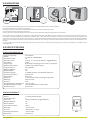
3.0 SPECIFICATIONS
.............................................................. 3
4.0 APPLICATION DIAGRAM
..................................................... 4
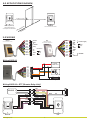
5.0 WIRING ......................................................................... 4
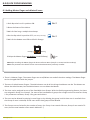
6.0 RECOMMENDED SWIPING TECHNIQUE ........................................... 5
6.1 Tapping the sensor
............................................................ 5
6.2 Scrolling the sensor up and down
................................................. 5
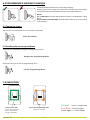
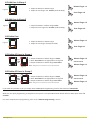
7.0 INDICATION
.................................................................... 5
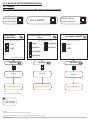
8.0 QUICK PROGRAMMING
.................................................... 6
8.1 Adding Master Finger and delete all users
......................................... 6
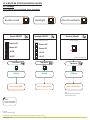
8.2 Add User In Group 1
........................................................... 7
8.3 Add User In Group 2
........................................................... 7
8.4 Delete user
............................................................... 7
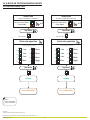
8.5 Delete All Users in Group 1
....................................................... 7
8.6 Delete All Users in Group 2
....................................................... 7
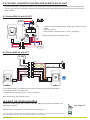
9.0 PAIRING - BIOMETRIC READER AND REMOTE RELAY UNIT
.............................. 8
9.1 Pairing B100-SA with DINRTT
................................................... 8
9.2 Pairing B100-SA with RTT
......................................................... 8
10.0 KEEP THE DOOR UNLOCK ........................................................... 8
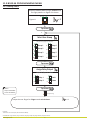
11.0 B100-SA PROGRAMMING MENU
................................................. 9
11.1 Adding Users ..................................................................... 9
11.2 Delete User
..................................................................... 10
11.3 Delete All users ................................................................... 10
11.4 Delete Group of Users ............................................................. 11
11.5 Add Administrator
............................................................... 12
11.6 Delete Administrator
............................................................. 13
11.7 Settings ......................................................................... 14
11.7.1 Double Swipe Unlocks Door, Entry Mode, Remote Relay Touch Function ................ 15
11.7.2 Buzzer Sound, Backlight, Reset to defaults
......................................... 16
11.8 Set Door Relay Time
........................................................... 17
1.0 INTRODUCTION
2.0 MOUNTING
1.0 INTRODUCTION
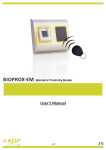
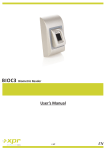
B100-SA is a simple one-door standalone biometric system. The reader can store up to 97 finger templates, it has one
relay output and one exit button input. If secure installation is needed, the reader can be connected to remote relay unit at
secured area, which also plays the role of request-to-exit push button. Complete setup and programming can be done by
scrolling and tapping on the sensor.
The sensor incorporates dedicated sensing hardware to facilitate the detection of “spoofing” attacks based on fake
fingers. This data is embedded into the image data stream, and is processed on the processor. The system is capable of
detecting and defeating well-known fake finger mechanisms, such as molded “gummy” fingers.
RTT is remote relay control unit for B100-SA(DINB100-SA) biometric reader. If secure installation is needed, the
biometric reader can be connected to remote relay unit at secured area, which also plays the role of exit push button. It has
one relay output and one exit button input.
www.xprgroup.com
2