1
Automatic Gas Console Advanced Functions
FineLine 260PC User’s Manual
Restoring Factory Default Cutting Conditions
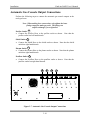
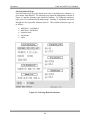
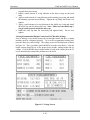
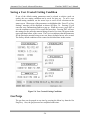
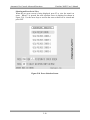
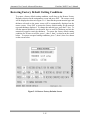
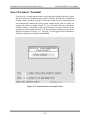
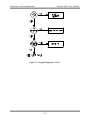
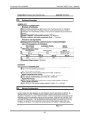
To restore a factory default cutting condition, scroll down to the Restore Factory
Defaults selection on the maintenance screen and press ENT. The restore screen
will be displayed as shown in Figure 5-14. Note that the present material type and
thickness selected on the status screen will be automatically displayed on the
restore screen. Press ENT to restore the factory default setting for the material
type and thickness displayed. To change the material type, press the F3 key. To
edit the material thickness, use the arrow keys to scroll to Thickness and use the
numerical keypad to enter the thickness. To restore the factory default cutting
condition for all user saved files, press 1, then 2, then 3 as shown on the screen
below. To restore corrupted cutting conditions, press 7, then 8, then 9 as shown
on the screen below.
Figure 5-14 Restore Factory Defaults Screen
5-15