1
Table of Contents
Get Started.........................................................................................................................................1
Your Tablet at a Glance ...............................................................................................................1
Set Up Your Tablet ......................................................................................................................1
Turn Your Tablet On ............................................................................................................3
Activate Your Tablet ....................................................................................................................3
Complete the Setup.....................................................................................................................4
Tablet Basics......................................................................................................................................5
Your Tablet’s Layout....................................................................................................................5
Key Functions .....................................................................................................................5
Turn Your Tablet On and Off ........................................................................................................6
Turn Your Screen On and Off.......................................................................................................6
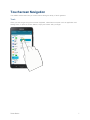
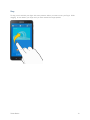
Touchscreen Navigation ..............................................................................................................7
Your Home Screen .................................................................................................................... 13
Create Shortcuts................................................................................................................ 13
Add and Remove Widgets .................................................................................................. 14
Extended Home Screens.................................................................................................... 14
Recent Apps...................................................................................................................... 14
Wallpapers ........................................................................................................................ 15
Status Bar ......................................................................................................................... 15
Notification Panel ...................................................................................................................... 17
Quick Settings ................................................................................................................... 18
Multi Window ............................................................................................................................ 19
Enable Multi Window ......................................................................................................... 19
Display Multi Window ......................................................................................................... 19
Using Multi Window ........................................................................................................... 20
Customize the Multi Window Apps ...................................................................................... 21
Features ................................................................................................................................... 21
Screen Capt ure ................................................................................................................. 21
Smart Screen .................................................................................................................... 21
Enter Text ................................................................................................................................. 22
Touchscreen Keyboards .................................................................................................... 22
Text Input Methods ............................................................................................................ 22
TOC
i