1
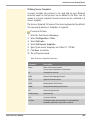
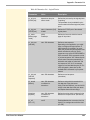
Appendix - Parameter List
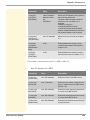
Parameters
Value
Description
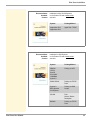
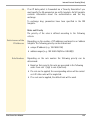
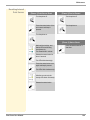
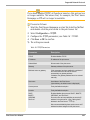
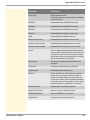
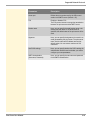
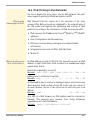
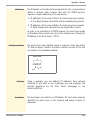
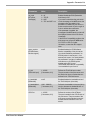
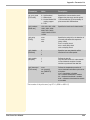
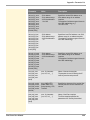
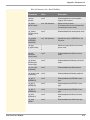
job_rcvtmout
[Job receive
timeout]
1 - 9999
[4 characters, 0-9]
0 = no timeout
Specifies the timeout (in seconds) for
receiving print jobs.
If the spooler does not send any print job
within the timeout period, the connection
between the print server and the spooler
will be interrupted. If the value is set to 0,
this function is disabled. If you want to
use the timeout option, we recommend
using the value '120'.
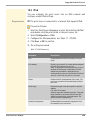
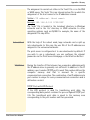
eth_conf
[Ethernet
settings]
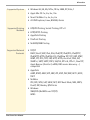
0 = Auto
1 = 10BaseT/FL HALF
2 = 10BaseT/FL FULL
3 = 100BaseFX/TX
HALF
4 = 100BaseFX/TX
FULL
5 = 1000BaseT/SX
Defines the network speed of the print
server.
'Auto' means that the network speed is
recognized automatically. If the speed is
set manually, it must be adapted to the
other network devices.
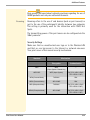
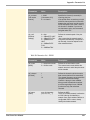
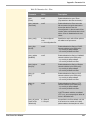
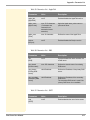
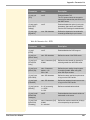
Table 29: Parameter List - WLAN
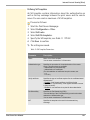
Print Server User Manual
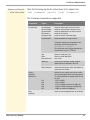
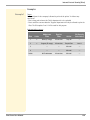
Parameters
Value
Description
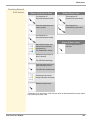
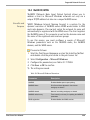
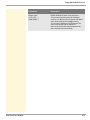
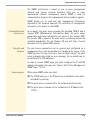
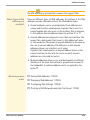
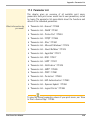
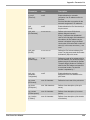
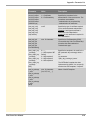
wifi_mode
[Mode]
1 = infrastructure mode
2 = Ad-Hoc mode
Defines the communication mode.
The communication mode defines the
network structure in which the print server
will be installed.
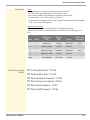
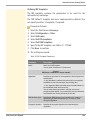
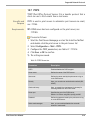
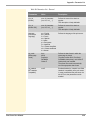
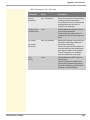
wifi_channel
[Channel]
1
~
14
Defines the channel to which the entire
data communication will be transmitted.
The channel (frequency range) should be
changed if interferences emerge.
Channels 1 through 14 are available.
Keep yourself informed about national
provisions regarding the use of WLAN
products and only use authorized
channels.
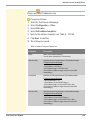
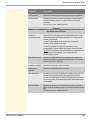
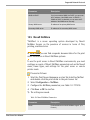
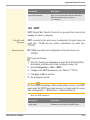
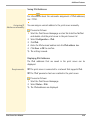
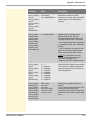
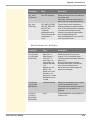
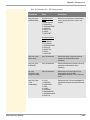
wifi_name
[SSID]
max. 64 characters
[a-z, A-Z, 0-9, _, -]
Defines the SSID.
The ID of a wireless network is referred to
as SSID (Service Set Identifier) or
network name. Each wireless LAN has a
configurable SSID in order to clearly
identify the wireless network.
261