1
Table of Contents
Introduction.....................................................................1
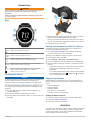
Keys ............................................................................................ 1
Charging the Device ................................................................... 1
Pairing Your Smartphone with Your Device ............................... 1
Support and Updates .................................................................. 1
Setting Up Garmin Express ................................................... 1
Activities......................................................................... 1
Starting an Activity ...................................................................... 2
Stopping an Activity .................................................................... 2
Skiing .......................................................................................... 2
Going Cross-Country Skiing .................................................. 2
Going Downhill Skiing or Snowboarding ................................ 2
Viewing Your Ski Runs ...................................................... 2
Hiking .......................................................................................... 2
Going for a Hike ..................................................................... 2
Running ...................................................................................... 2
Going for a Run ...................................................................... 2
Running with the Metronome ................................................. 2
Biking .......................................................................................... 3
Going for a Ride ..................................................................... 3
Swimming ................................................................................... 3
Going for a Pool Swim ........................................................... 3
Swim Terminology ............................................................. 3
Stroke Types ..................................................................... 3
Resting During Pool Swimming ......................................... 3
Training with the Drill Log .................................................. 3
Going for an Open Water Swim ............................................. 3
Multisport .................................................................................... 4
Starting a Triathlon or Multisport Activity ............................... 4
Creating a Multisport Activity ................................................. 4
Indoor Activities .......................................................................... 4
Navigation....................................................................... 4
Setting a Training Target ............................................................ 7
Cancelling a Training Target .................................................. 7
Racing a Previous Activity .......................................................... 7
Personal Records ....................................................................... 7
Viewing Your Personal Records ............................................ 7
Restoring a Personal Record ................................................. 7
Clearing a Personal Record ................................................... 7
Clearing All Personal Records ............................................... 7
Running Dynamics ...................................................................... 7
Training with Running Dynamics ........................................... 8
Color Gauges and Running Dynamics Data .......................... 8
Tips for Missing Running Dynamics Data .............................. 8
About VO2 Max. Estimates ......................................................... 8
Getting Your VO2 Max. Estimate for Running ....................... 8
Getting Your VO2 Max. Estimate for Cycling ......................... 9
VO2 Max. Standard Ratings .................................................. 9
Viewing Your Predicted Race Times ..................................... 9
Recovery Advisor ........................................................................ 9
Turning On the Recovery Advisor .......................................... 9
Viewing Your Recovery Time ................................................. 9
About Training Effect .................................................................. 9
History........................................................................... 10
Using History ............................................................................ 10
Multisport History ................................................................. 10
Viewing Your Time in Each Heart Rate Zone ...................... 10
Viewing Step Totals .................................................................. 10
Viewing Data Totals .................................................................. 10
Deleting History ........................................................................ 10
Clock.............................................................................. 10
Setting the Alarm ...................................................................... 10
Starting the Countdown Timer .................................................. 10
Using the Stopwatch ................................................................. 10
Connected Features..................................................... 10
Saving Your Location ................................................................. 4
Navigating to a Destination ......................................................... 4
Navigating with Sight 'N Go ........................................................ 4
Compass ..................................................................................... 4
Map ............................................................................................. 4
Panning and Zooming the Map .............................................. 4
Navigating To Your Starting Point .............................................. 5
Altimeter and Barometer ............................................................. 5
Enabling Bluetooth Notifications ............................................... 11
Viewing Notifications ............................................................ 11
Managing Notifications ......................................................... 11
Turning Off Bluetooth Technology ....................................... 11
Garmin Connect ........................................................................ 11
Using Garmin Connect Mobile ............................................. 11
Using Garmin Connect on Your Computer .......................... 11
Wi‑Fi® Connected Features ..................................................... 11
Setting Up Wi‑Fi Connectivity .............................................. 11
Training........................................................................... 5
Connect IQ Features .................................................... 11
Setting Up Your User Profile ....................................................... 5
Fitness Goals ......................................................................... 5
About Heart Rate Zones ........................................................ 5
Setting Your Heart Rate Zones ......................................... 5
Heart Rate Zone Calculations ........................................... 5
About Lifetime Athletes .......................................................... 5
Activity Tracking .......................................................................... 5
Turning On Activity Tracking .................................................. 5
Using the Move Alert .............................................................. 6
Auto Goal ............................................................................... 6
Sleep Tracking ....................................................................... 6
Using Sleep Mode ............................................................. 6
Workouts ..................................................................................... 6
Following a Workout From the Web ....................................... 6
Starting a Workout ................................................................. 6
About the Training Calendar .................................................. 6
Using Garmin Connect Training Plans .............................. 6
Interval Workouts ........................................................................ 6
Creating an Interval Workout ................................................. 6
Starting an Interval Workout .................................................. 6
Stopping an Interval Workout ................................................ 7
Using Virtual Partner® ................................................................ 7
Downloading Connect IQ Features .......................................... 12
Downloading Connect IQ Features Using Your Computer ....... 12
Widgets ..................................................................................... 12
Viewing Widgets .................................................................. 12
VIRB™ Remote ................................................................... 12
Controlling a VIRB Action Camera .................................. 12
Table of Contents
Customizing Your Device ............................................ 12
Activity App Settings ................................................................. 12
Customizing the Data Screens ............................................ 12
Adding a Map to an Activity ................................................. 13
Alerts .................................................................................... 13
Setting an Alert ................................................................ 13
Enabling Auto Pause® ......................................................... 13
Auto Lap® ............................................................................ 13
Marking Laps by Distance ............................................... 13
3D Speed and Distance ....................................................... 14
Using Auto Scroll ................................................................. 14
UltraTrac .............................................................................. 14
Power Save Timeout Settings .............................................. 14
Watch Face Settings ................................................................. 14
Customizing the Watch Face ............................................... 14
i