1
Version 1
DEBUG MENU
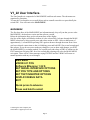
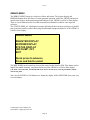
The DEBUG MENU brings up a selection of three sub menus. The register display and
EEPROM display show the status of current program operation with in the VR2003 and may be
useful when trying to understand unexpected behavior of the VR2003 or a POS or Pole display.
There is a lot of numerical data in coded form and this information could be video taped for
reference.
The STATUS DISPLAY will display messages indicating if there has been serial port or parallel
port errors that could be useful when trying to understand unexpected behavior of the VR2003 or
a POS or Pole display.
DEBUG MENU
REGISTER DISPLAY
EEPROM DISPLAY
STATUS DISPLAY
HEX DUMP: OFF
EXIT
Quick press to advance
Press and hold to select
The HEX DUMP can be turned on to reveal the control codes from the POS. This feature can be
helpful for trouble shooting unexpected behavior of the VR2003 or a POS or Pole display.
CAUTION, once turned ON, the HEX DUMP mode must be turned off by reentering the DEBUG MENU
and selecting OFF.
Note: Set the VR2003 for 28 characters to format the display of the HEX DUMP into seven easy
to read columns.
Contacting the VRX Company Inc.
Send email to: support@vrxinc.com.
Page 11