1
D:/Old Notebook/web20120511 Go Daddy/html/product/pc_player/data/mcg_manager_manual/sub/userManu
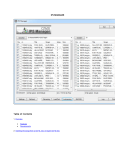
5. Modifying title or artist information
1. To change the title and artist information, start the MCG Manager program. Press TARGET(4)
to select the external USB drive (F:\Karaoke-cdg).
2. Press MODIFY(11) and the TARGET window will show all MP3 + MCG files stored inside the
sub-folder _songs (same as all the songs inside the external USB drive).
3. Click on a title or artist that you wish to change. Type in the new value. Press REBUILD(12).
4. Changes made can be confirmed by pressing MODIFY(11) again to bring up the songs.
5. Printing song list
a. Printing song list using MCG Manager
1. Start the MCG Manager program. Press TARGET(4) to select a folder or an external USB drive
created under the Section 1 and Section 2 above.
2. Press Print(16) button under the TARGET window. This will bring up the Microsoft Notepad with
the song list file Juke.txt open.
페이지 21