1
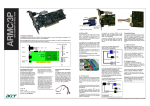
Panel keystoke instruction
If the projector is the new one please read projector install
chapter placed the projector connect the powerwire and the signelwire
the operation as follow:
Panel keystoke sketch map
Open operation
1.Before use the remoter .
Put in two 7 size battery in it
2. Open the power switch on the backboard
the power light begin to flash
press the power key on the remote control or panel
the indicator light turn light
1
Power key
It can open or close the projector
its function same as the "power"
in the remote control
3 Menu,direction Key
It can adjust the menu by
UP/Down ,left/righ
4
PC/AV Key
It can choose the input signal
(such as: AV.SVIDEO .Component video ,
HDMI,PC or TV)
Indicator light
After 2 second the projector lamp begin work
began appear unclear white light on the screen
after 2 minute,the projector begin work
5. For the new projector. When the frist time to use maybe will appear image
unclear or trapezoid distortion please read image adjustment chapter
6. After the image is clear then you can watch program during watching
you also can setup the system parameter please read menu setting chapter
Close operation
1.During use the projector press
switch to stay situation
power
key can let the projector
2.After inter into stay situation the projector under auto protect auto release hot
the indicator light is flase situation but here the projector is under auto protect
situation not accept any order if need to startup again must wait for finished
the release hot .