1
2. OTHER POINTS TO CHECK
We are now going to quickly overview the rest of configuration menus where it is
recommended to check that every parameter is correctly configured.
Coding Algorithm
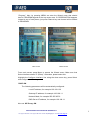
At the Wizard menu Sel.Codec should be G722, for a start, although you can
change this at a later stage for better quality. In order to change the coding
algorithm by another pre-selected one, just select the Sel.codec line, press
Select and select one within the new window shown. In order to choose the
particular coding modes in each list shown in the Sel.codec menu, go to Menu
ADVANCED
6. Link profiles
Select
Options.
The audio routing will be most likely correct by default to send Mic 1 audio to
the transmission and send the received stream to HP1 headphone output. You
can, however, make sure of this from Menu
ADVANCED
3. Audio Settings
Select.
Configure the rest of parameters after reading the manual according to your particular
needs.
PROXY SIP Configuration
You can make sure that this is correct from the main screen: Menu
ADVANCED
5. Communications
3. SIP config
1. Parameters:
Check that User Name is filled with a user identifier that is previously registered
at the AEQ SIP server (for example: phoenix_123).
STUN Protocol
2 Activate ON
This is important and recommended, as it will ease connecting to other
equipment that is behind a router in a local network.
3 Server: At the moment of writing this document, the following STUN server is
recommended: “stun.voxgratia,org” (IP=83.103.82.85)
If the DNS Server field in the communications menu hasn’t been configured,
you must substitute the STUN name by its IP.
4 Port : 3478
Press “back” key in order to go to 3. SIP config
2. Proxy and check:
1 Activate ON
2 Address: sip.aeq.es.
APLICACIONES ELECTRONICAS QUASAR S.A.
TEL: (34) 91 686 13 00 - FAX: (34) 91 686 44 92 - E-mail: aeqsales@aeq.es - Web:
3
www.aeq.eu