1
CC-RD100N
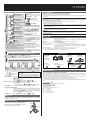
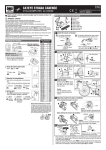
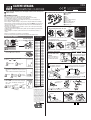
Operating the computer [Measuring screen]
Tm Elapsed Time
Indicates whether the current speed
is faster ( ) or slower ( ) than the
average speed.
0:00’00” - 9:59’59”
Current speed
Dst Trip Distance
0.00 - 999.99 km [mile]
0.0(4.0) - 200.0 km
[0.0(3.0) - 125.0 mph]
Dst 2 Trip Distance-2
Selected Mode
0.00 - 999.99 /
1000.0 - 9999.9 km [mile]
Av Average Speed*2
0.0 - 200.0 km/h
[0.0 - 125.0 mph]
Mx Maximum Speed
MODE
0.0(4.0) - 200.0 km/h
[0.0(3.0) - 125.0 mph]
*1
Troubleshooting
Pace arrow
Odo Total Distance
0.0 - 9999.9 /
10000 - 99999 km [mile]
Clock
0:00 - 23:59
or 1:00 - 12:59
*1 With the computer installed on the
bracket, press on the three raised dots on
the face of the computer.
*2 If Tm exceeds approximately 27 hours or
Starting/Stopping measurement
Measurements occur automatically
when the bicycle is in use. During
measurement,
or
flashes.
Switching computer function
Pressing MODE switches function,
in order, as shown on the left.
Resetting data
To reset measurement data, display
any data other than for Dst-2 and then
press and hold MODE. Pressing and
holding MODE with Dst-2 displayed
resets Dst-2 only.
The total distance is never reset.
Power-saving function
If the computer has not received
any signal for an hour, powersaving mode will activate and only
the clock will be displayed.
Dst exceeds 999.99 km, .E (Error) is Alternatively, if the sensor detects a
displayed as the average speed. Reset data. signal or MODE is pressed, the main
display reappears.
MODE does not work when the computer is mounted on its bracket.
Check that there is no dirt between the bracket and the computer.
Wash off the bracket with water to get rid of any dirt, and to ensure that the computer slides in and out
smoothly.
Speed and distance are not displayed. (Touch a metal item against two contact points of the computer
several times to create a short circuit while observing the display. If a numeric value appears, this signifies
that the computer is functioning normally.)
Is the clearance between the sensor and magnet too great? (must be ≤ 5 mm)
Does the magnet pass through the sensor line?
Adjust the positions of the magnet and sensor.
Is there any foreign matter (which would prevent a clean contact) on the contact points of the computer
and/or bracket?
Clean the contact points.
Check that no wire cable is worn or broken. Even with a normal appearance, it may be that a wire cable
could be broken internally. Replace the bracket sensor set.
No display.
Is battery in the computer run down?
Replace it. Then reinitialize the computer referring to “Preparing the computer”.
Incorrect data appear.
Reinitialize the computer referring to “Preparing the computer”.
Specification
Battery ...................................... Lithium battery (CR1620) x 1
Battery life ................................ Approx. 3 years (Using the battery one hour a day; the battery life will vary with the
conditions of use.)
Controller .................................. 4-bite, 1-chip microcomputer (Crystal controlled oscillator)
Display ...................................... Liquid crystal display
Sensor ...................................... No contact magnetic sensor
Wheel circumference range ..... 0100 mm - 3999 mm (Default figure A: 2096 mm, B: 2096 mm)
Working temperature ............... 32 °F - 104 °F (0 °C - 40 °C) (This product will not display appropriately when exceeding the
Working Temperature range. Slow response or black LCD at lower or higher temperature
may happen respectively.)
Dimensions/weight ................... 1-53/64” x 1-7/32” x 19/32” (46.5 x 31 x 15 mm) / 0.63 oz (18 g)
* The factory-loaded battery life might be shorter than the above-mentioned specification.
* The specifications and design are subject to change without notice.
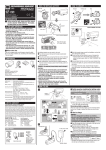
Changing the computer settings [menu screen]
Standard parts
To bring up the menu screen, press MENU in any mode.
Each time MODE is pressed, the relevant menu screen appears. Pressing and
MENU
holding MODE changes the setting of the displayed menu.
#160-0280
Bracket band
#160-0290N
Parts kit
#160-0270N
Bracket/Sensor
#160-0291N
Rear long cable
MODE
#169-9691
Wheel magnet
MODE
Wheel
selection
MODE
MODE
Wheel size
entry
Setting change
(by pressing &
holding)
MODE
Clock setting
Total distance
manual entry
Speed unit
LIMITED WARRANTY
Wheel selection ..... Toggle between the specified wheel size (tire circumference)
and
. Use this function if the computer is to be shared
between two bicycles.
and
.
Pressing MODE toggles between
Wheel size entry .... Pressing MODE increases the value, and pressing and
holding MODE moves to the next digit.
, display
using “Wheel selection”.
* To enter the wheel size
Clock setting .......... To set the clock, refer to “Preparing the computer-4”.
Total distance manual entry
................................ Before reinitializing the computer, note the total distance. This
reading will later allow you to enter the total distance
manually. Pressing MODE increases the value, and pressing
and holding MODE moves to the next digit.
Speed unit .............. Pressing MODE toggles between
and
.
Maintenance
To clean the computer or accessories, use diluted neutral detergent on a soft cloth,
and wipe it off with a dry cloth.
Replacing the battery
Close
Open
Optional Parts
#160-2770
Bracket holder
MODE
* After changing, be sure to press MENU to register
the setting.
* If the menu screen is not touched for a minute, the
Measuring screen reappears without data changes.
If the display appears faded, replace the battery.
Install a new lithium battery (CR1620) with the (+)
side facing upward. Then reinitialize the computer
referring to “Preparing the computer”.
#169-6180
Lithium battery (CR1620)
CO
IN
CR1620
2-Year Computer only
(Accessories/Bracket sensor and Battery Consumption excluded)
CatEye cycle computers are warranted to be free of defects from materials and workmanship for a period of two years
from original purchase. If the product fails to work due to normal use, CatEye will repair or replace the defect at no
charge. Service must be performed by CatEye or an authorized retailer.
To return the product, pack it carefully and enclose the warranty certificate (proof or purchase) with instruction for
repair. Please write or type your name and address clearly on the warranty certificate.
Insurance, handling and transportation charges to CatEye shall be borne by person desiring service.
For UK and REPUBLIC OF IRELAND consumers, please return to the place of purchase. This does not affect your statutory
rights.
CO.,LTD.
2-8-25, Kuwazu, Higashi Sumiyoshi-ku, Osaka 546-0041 Japan
Attn: CATEYE Customer Service Section
Service & Research Address for USA
CatEye North America
2300 Central Ave Suite L Boulder, CO 80301
Phone: 303.443.4595
Toll Free: 800.5CATEYE
Fax:
303.473.0006
E-mail: service@cateye.com
URL:
http://www.cateye.com