1
INTREPID User Manual
Library | Help | Top
Map composition (G17)
2
| Back |
Parallel interactive tool and programming language
Map Composition has two elements that can work in parallel:
•
An interactive Map Composition tool,
•
A block-structured map language called MAPCOMP.
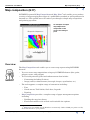
The interactive tool is powerful interactive ‘what you see is what you get’ composition
tool. You can print your compositions directly from the interactive tool, or
automatically save their specifications in MAPCOMP language.
The MAPCOMP language forms the basis for an extremely powerful batch system
with complete facilities for detailed, professional quality maps. You can create or edit
MAPCOMP files using any text editor. You can print directly from a MAPCOMP file.
Printer output
Under UNIX, Map Composition can create output for PostScript, HP–GL and HP–GL/
2 printers as well as TIFF and Windows output formats.
Under Windows Print Map supports any appropriate printer for which there is a
Windows driver. You can also print to file in any of the UNIX output formats.
Context of this guided tour
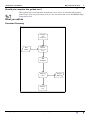
In the context of your data processing cycle, this tour represents the production
of an illustration of a dataset for use in an internal report or at a meeting.
Location of sample data for Guided Tours
We provide two complete sets of sample datasets, one in INTREPID format and one
in Geosoft format. INTREPID works equally well with both formats. When you want
to open a dataset, navigate to the directory containing the required data format.
Where install_path is the path of your INTREPID installation, the project
directories for the Guided Tours sample data are
install_path\sample_data\guided_tours\intrepid_datasets and
install_path\sample_data\guided_tours\geosoft_datasets.
For example, if INTREPID is installed in
C:\Program Files\Intrepid\Intrepid4.5.nnn,
then you can find the INTREPID format sample data at
C:\Program Files\Intrepid\Intrepid4.5.nnn\sample_data\
guided_tours\intrepid_datasets
This is the default location for the sample data. If you have installed INTREPID
normally, the data resides there. If you have installed INTREPID elsewhere, the
exercises will work just as well. Just use the appropriate pathnames.
For more information about installing the sample data, see "Sample datasets—
installing, locating, naming" in INTREPID Guided Tours Introduction (G01)
For a more detailed description of INTREPID datasets, see Introduction to the
INTREPID database (G20). For even more detail, see INTREPID database, file and
data structures (R05).
Library | Help | Top
© 2012 Intrepid Geophysics
| Back |