1
Manual revision 007
Section 3: Preparing for Deployment
SBE 16plus-IM V2
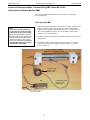
Test and Set SBE 16plus-IM V2 ID Using SIM
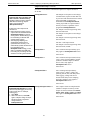
Note:
See SeatermV2 and
SeatermIM Help files.
1.
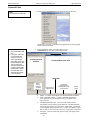
Double click on SeatermV2.exe. In the Instruments menu, select
SBE 16plus V2 IM. SeatermIM opens.
2.
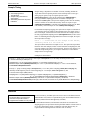
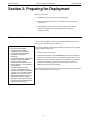
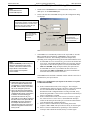
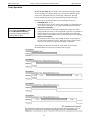
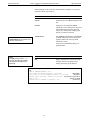
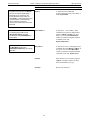
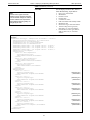
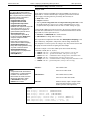
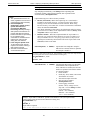
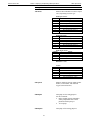
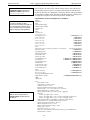
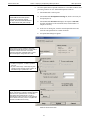
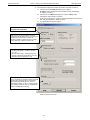
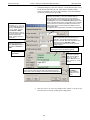
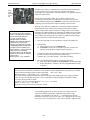
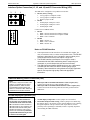
If this is the first time SeatermIM is being used, the configuration dialog
box displays:
Computer COM port and baud rate for
communication between computer and SIM
or IMM. SeatermIM tries to connect at this
baud rate, but if unsuccessful will cycle
through all available baud rates.
Set to Automatically
get ID when only one
16plus-M V2 is
connected.
Set to Use fixed ID if
multiple IM instruments are
on-line. Enter ID for
instrument with which you
want to communicate.
Make the desired selections, and click OK.
3.
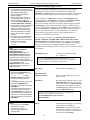
Note:
!iiDS and #iiGetHD provide factory-set
data such as instrument type, serial
number, and firmware version for the
16plus-IM V2’s communication
microcontroller and acquisition
microcontroller.
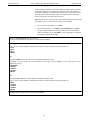
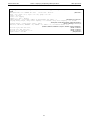
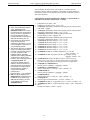
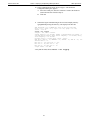
SeatermIM tries to automatically connect to the 16plus-IM V2. It sends
DS to get SIM status information, and PwrOn to wake up all IM
instruments on the line. The remaining connection attempt varies,
depending on the configuration setting the last time SeatermIM was used:
• If SeatermIM was set to Automatically get instrument ID the last time
it was used – SeatermIM sends id? and waits for a response from the
16plus-IM V2. Once the ID response is received, SeatermIM sends
!iiDS and #iiGetHD, using the ID provided by the 16plus-IM V2.
• If SeatermIM was set to Use fixed ID the last time it was used –
SeatermIM sends !iiDS and #iiGetHD, using the fixed ID that was
entered the last time the software was used.
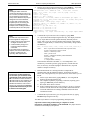
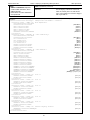
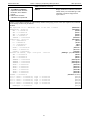
SeatermIM then fills the Send Commands window with the correct list of
commands for your 16plus-IM V2.
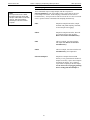
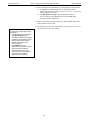
Notes:
• SeatermIM’s baud rate must be the
same as the IMM or SIM baud rate,
as applicable. For both the SIM and
the IMM, baud is factory-set to 9600,
but can be changed by the user.
• Set to Use fixed ID to designate the
appropriate 16plus-IM V2 if there are
multiple IM instruments on the IM line.
If desired, use Automatically get
instrument ID if there is only one
16plus-IM V2 on the IM line. Note that
the ID is stored in the 16plus-IM V2’s
EEPROM and can be changed so
that multiple IM instruments on a
single IM line each have a unique ID.
See the Configuration Sheet for the
factory-set ID.
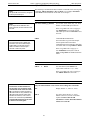
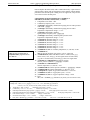
If there is no communication (no response to id? and/or no response
to !iiDS and #iiGetHD):
A. In the Communications menu, select Configure. The Configure
Communications dialog box appears. Select the Comm port and baud
rate for communication. Note that the factory-set baud rate is
documented on the Configuration Sheet. If using a fixed ID, verify
that the designated ID is correct for the 16plus-IM V2 with which you
want to communicate. Click OK.
B. In the Communications menu, select Connect (if Connect is grayed
out, select Disconnect and reconnect). SeatermIM will attempt to
connect at the baud specified in Step A, but if unsuccessful will then
cycle through all other available baud rates.
C. If there is still no communication, check cabling between the
computer, SIM or IMM, and 16plus-IM V2, and try to connect again.
D. If there is still no communication, repeat Step A with a different
comm port and/or different fixed ID, and try to connect again.
27