1
Atomos Samurai
Connect & Power-up
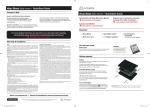
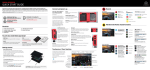
Attach Battery 1
Gently slide down into battery
slot/s and lock into position
ATTACH BATTERIES:
Connect one or both batteries to the
Samurai. Use the battery connector
marked with a ‘1’ for the first battery.
You should consider this your primary
battery and the other as a secondary/
back-up battery.
Release
Push latch towards battery to
release and gently slide battery
upwards to remove
The Samurai utilises only one battery at a
time. This way a battery can be removed,
charged and replaced during operation.
Refer to complete User Manual for more
information.
Important Samurai can only power up
from the Primary [1] battery position
fig. 4
CONNECT:
Video Input
Connect camera to
Samurai using SDI cable
with supplied SDI Adaptor
LANC Remote
Optionally control the
Samurai using LANC remote
control connected here (use
2.5mm TRS/ 3-pin plug)
Video Output
Connect external device
via SDI cable with our
SDI Adaptor
Share remote control with
other devices (loop thru)
by connecting them to the
second LANC connector
Insert
Insert Master Caddy into
the Samurai until it clicks
into position
Audio
Stereo Line In
fig. 5
Eject
To eject Master Caddy,
slide the latch on the
side of the Samurai.
The Master Caddy is
hot-swappable so you
can do this at any time,
except while recording
POWER:
Mount
Mount the Samurai on or
between camera or tripod
using the standard tripod screw
mounts top and bottom
On/Off
Briefly press the circular
button on the side of the
Samurai to power-up
To shutdown,
depress button for
at least 4 seconds
(until unit turns off)
Stereo Line Out
or Headphones
fig. 6