1
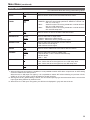
Main Menu (continued)
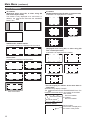
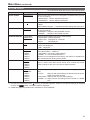
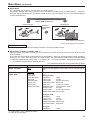
Types of MARKER
16:9 marker
(Displayed when using HD, or when using SD
with a 16:9 aspect ratio)
The marker is only displayed as a vertical bar. In
section becomes the “MARKER
addition, the
BACK” item.
4:3 marker
4:3 marker
(Displayed when using SD with a 4:3 aspect ratio)
A dotted line is displayed as the marker.
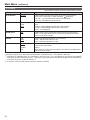
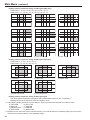
95% Area marker
93% Area marker
90% Area marker
88% Area marker
13:9 marker
14:9 marker
VISTA marker, CNSCO marker
A horizontal dotted line is displayed as the marker.
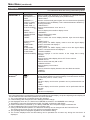
80% Area marker
(Displayed when using HD, or when using SD
with a 16:9 aspect ratio)
A dotted line is displayed as the marker.
VISTA marker
CNSCO marker
Area marker
A dotted line is displayed as the marker.
95% Area marker
90% Area marker
80% Area marker
95% Area marker
93% Area marker
90% Area marker
88% Area marker
93% Area marker
88% Area marker
80% Area marker
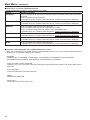
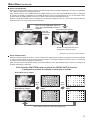
∗ You can display 4:3 marker at the same time as
16:9 marker.
Simultaneously display example
The
section becomes the “MARKER BACK” item. The
background selected with the 16:9 marker is controlled.
16:9 marker:
95% Area marker
80% Area marker 4:3 marker:
80% Area marker
95% Area marker
Center marker
Center marker
The marker is displayed in
the center of the picture.
18