1
Si10-416A
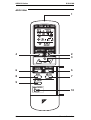
ARC412 Series
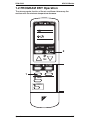
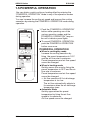
1. SIGNAL TRANSMITTER
Send signals to the air conditioner.
2. ON/OFF button
Press once to start operation.
Press once more to stop operation.
3. ROOM TEMPERATURE
ADJUSTING buttons
Use these buttons to set the room temperature as you
like.
Temperature setting range
COOL ... 18°C - 32°C
HEAT ... 14°C - 28°C
AUTO ... 18°C - 28°C
4. TIMER OFF SETTING button
5. TIMER ON SETTING button
6. TIMER CANCEL button
7. AIR FLOW ADJUSTING button
Five choices are available for airflow setting. "AUTO",
the computer changes the air flow automatically
according to the room temperature.
8. OPERATION MODE SELECTOR button
9. SWING button
10. POWERFUL mode button
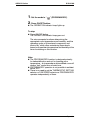
Note:
Display monitor function :
You can check or change settings when the air
conditioner is stopped. To check, press once the button
for the setting you are checking. To change the setting,
press the same button again while the display is ON.
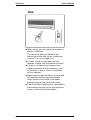
Unit operation panel and display panel
OPERATION indicator lamp
(green)
Lights up on system activation
irrespective of operation mode.
TIMER indicator lamp
(green)
Lights up when “TIMER ON” or “TIMER
OFF” countdown is in progress.
Temperature sensor
monitors room temperature.
ON/OFF button
Signal receiver
Receives signals from the remote controller.
Remote Controllers
61