1
TABLE OF CONTENTS
INTRODUCTION AND DIRECTIONS FOR USE
1. BASIC INSTALLATION AND OPERATION
3. DESCRIPTION OF ALL FUNCTIONS AND MENU ITEMS
1.1
1.2
1.3
1.4
1.5
1.6
1.7
1.8
1.9
1.10
1.11
1.12
1.13
1.14
1.15
1.16
1.17
1.18
3.1 User management
3.2 User Role
3.3Communication
3.4System
3.5Personalize
3.6 Data management
3.7 Access Control
3.8 USB Manager
3.9 Attendance search
3.10 Short Message
3.11 Work Code
3.12Autotest
3.13 System Info
3.14 Use of biometric data
Package contents
3
Wallmount installation
4
Terminal - description of the keys
5
Fingerprint placement
6
Installing the terminal in your network
6
LAN connection
7
WiFi connection
8
DHCP: pros and cons
8
Setting up an administrator user (super admin) 8
Registering a fingerprint
9
Registering an RFID card or key fob 9
Setting a password
10
Date and time settings
10
Enrolling users (normal user)
11
Clocking in / clocking out
12
Retrieving user and clocking data using a
USB stick
12
Uploading user data to the terminal
13
Checking clocking data on the terminal
13
2. ADVANCED USAGE SCENARIOS
2.1 User Management
2.2 Edit users
2.3 Delete users
2.4 Expiration Rule
2.5 Expiration Rule options
2.6 Using work codes
2.7 Daylight saving time
2.8 Custom user roles
2.9 Short Message Service
2.10 Customise the function keys
2.11 Punch State values
2.12 Menu shortcuts
2.13 Access control
2.14Holidays
2.15 Link between users, access groups time schedules and verification modes
2.16 Duress Options
2
14
14
15
15
15
16
18
21
22
23
23
24
25
27
27
28
29
29
29
30
31
31
32
32
32
32
33
33
33
33
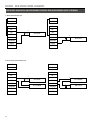
APPENDIX
Door access control schematics
34