1
Presentation (continued)
HMI software
Vijeo Designer configuration software
Advanced functions
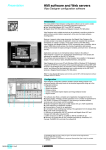
Data Manager: Transfer recipes, videos, images, etc. via
Ethernet or USB, simply by clicking the mouse
Based on new information technologies, Vijeo Designer features a large number of
advanced functions for processing a higher volume of data, both faster and more
reliably:
b Multimedia data management in the most popular formats:
v Image display (jpeg, bmp, emf and png files)
v Text display and processing (txt files)
v Sound message processing (wav files)
b Alarm or curve logs recorded
b Zoom in/out on trending curves for a detailed analysis
b Alarm management All variables can be categorized as "Alarms" and can be
customized in respect of visualization and acknowledgment. These Boolean and
analogue threshold type alarms can be printed on the fly.
b Multimode application transfer: via serial link, via USB, via Ethernet network, and
by using Compact Flash memory card on multifunction terminals
b Backup of application source files on the terminal or iPC to facilitate maintenance
b User-friendly data exchange between PC and terminal using the Data Manager
tool
b Integrated FTP server for downloading/uploading recipes via Ethernet TCP/IP and
restoring logs to Magelis GT/GK/GTW and Magelis iPC
b Multiport communication for multifunction terminals - 2 serial links and 1 Ethernet
network can be active simultaneously
b Action table for associating a particular behaviour with an event
b Use of a USB memory stick (up to 4 GB) for application downloads/uploads, data
retrieval or recipe exchange
b E-mail on action and event (the e-mail text can contain up to 1000 characters)
WEB Gate remote connection
Vijeo Designer supports a WEB Gate remote connection with any platform which has
an Ethernet connection point
Alarm management
WEB Gate supports remote visualization of Vijeo Designer applications with Internet
Explorer on any PC running Windows XP or Windows Vista. The size of the page
displayed is determined by the terminal.
WEB Gate supports the display of pages similar to those in the Vijeo Designer
application, or of different pages, i.e. start-up pages and navigation pages can be
differentiated in order to reflect the type of access (terminal/WEB Gate).
Several connections are possible at the same time, with the number depending on
the size of the application.
The high security mode of WEB Gate excludes any risk of applications jamming as a
result of variables being modified via the terminal and WEB Gate at the same time.
For increased confidentiality:
b WEB Gate access can be restricted to only those PCs whose IP address appears
in the licensing list.
b Some Vijeo Designer functions are not supported by WEB Gate:
v Application shutdown, restart
v Terminal configuration
v Reading of an acoustic animation (sound file)
v Display of a recorded video sequence
WEB Maintenance remote diagnostics
In addition to WEB Gate, Vijeo Designer features the embedded diagnostics service
WEB Maintenance - Transparent Ready WEB Server Class B15 (1) - this server's
navigation bar features an option for accessing the following functions:
b WEB Gate
b Animation tables
b Web interface for the restoration of data files (recipes, logs, multimedia files)
Note: Terminals programmed using Vijeo Designer can be accessed directly via their names.
This function is supported by the DHCP and DNS network services.
Report printing
(1) Please consult our "Control and automation, Ethernet TCP/IP and the Web" catalogue.
4
version: 10.0
36349-EN.indd