1
submenu DISPLAY window. branching from the main menu,
allows the user access to a two-screen DISPLAY listing key
notes or instructions. Also accessible through the submenu is
a credit or acknowledgement screen DISPLAY identifying the
participants associated with the interagency collaborative
effort for South Dakota FAS Surveillance. For this application,
these screen DISPLAY types were stored as HELP entries in a
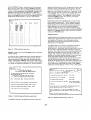
single FASAF catalog (Figure 2). All menu and submenu
displayed and descrIbes more fully the particular selection and
restrictions which could possibly be encountered. The user
then has to choose between proceeding with this main menu
selection. or returning to the main menu. Transparent to the
user. if the user chooses to proceed, is the SCL code written
in the SOURCE window which invokes SAS/FSP software
using the CALL statement. Each DISPLAY window and its
associated SOURCE window were stored in the FASAF
catalog as a PROGRAM entry.
UILn: AT7~ A!SFRIIoIIUU [ E l - - - - - - - - - - - - - - ,
COllunD =:=,
Option
Mal!
Type
ABSFR~DE
PROGRAM
PROGRAW
ABSFRW
~CHRTOE
P~OGRAII
GCHRn
ORIENT
OTHER
JlROGRAIi
IIENO
!lEMU
Ubref
Catalog
Preserving security for this database was a concern of the
FAS Surveillance Project staff. SAS/AF was used to front
FASAF with a security window. In this window, FASAF is
clearly identified as U.S. Government property and without
proper clearance, the user cannot access the database.
Various warnings are issued upon repeated attempts to bypass this window. This security feature comprises a DISPLAY
window and a SOURCE window. and is stored in the FASAF
catalog as a PROGRAM entry.
lIenu-lini
SASIFSP software
SAS/FSP software is implemented for data entry or browsing
of data sets. The user selects an option from the main menu
and responds affirmatively in the confirmation window.
Transparent to the user. SCL code executes and the user
gains access to the database.
To facilitate data entry. a series of customized screens are
displayed in order to effect uninterrupted keying of an
abstraction form. Specifically. data entry proceeds one record
at a time into a relational database consisting of two SAS
data sets. The medical chart data set comprises 359 labelled
and formatted variables, accessed through 17 data entry
screens. The" accessory" growth chart data set includes 17
labelled and formatted variables displayed on one data entry
screen and contains mUltiple records per individual
corresponding to a single record per abstraction form keyed
into the medical chart data set. Opening the data entry
facility for the growth chart can occur either directly from the
main meou, or from the appropriate screen during data entry
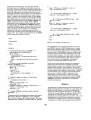
of the medical chart abstracted data using a CALL FSEDIT
statement in the SCL (Figures 1 and 4). Prior to keying data
~------------------------___ OO~
Figure 2. ATTR window for main menu
DISPLAY windows were stored as MENU entries in the same
FASAF catalog.
To assist the user in understanding any extended features of
the current menu selection. or in order to ensure that data
entry personnel are certain about their selected main menu
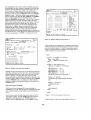
optian. "confirmation" DISPLAY windows open following one
of four menu selections, whereby the database may be added
to. editted. or simply browsed (Figure 3). In these windows.
4. ,.rolth cnart--brolS!
COlilland ===>
io nit Quicki), press flO.
·S~OIT SD.A5sTro~II-----------------,
CJlmand ==:>
SOUTH DAKOTA FAS SURVE!LUKCE
FASAF (YfRSiOH 5)--GilOWTH CURT BROWSE CONFIRIIATIOM
u~NIMG:
This o~tion opens th Grolth Cbart data set in ~rOlSe lo~e.
You ny brolse tbe ~ata set
{O one record at I tile using tne ~ata entry scmn, or
(iO in tabular fm headed lith the SAS variable nalles.
Is
Was
Hate: No records uy be added. No retards aay be editted.
fai;ure-to-t~rive
fFi') dugnosed:
_ (Y:Yes, M=Nc)
_ (Y:Yes, M=Kol
Otheflise, •.•
To access tft! grorth chrt dlta independent of U-e char> atsttact ion forI,
return to the uin :nenu (press rlO) then select option ~.
Do 1011 lish to brolSe .uUiDle records ger screen? _ (y=Yes)
fie to return to
deflciency nentionlc in He chart; _ (y,.yU, fI=Mo)
00 you ,ish to enter grOIU chart data nOI? _ (Y=YeS, tllen ~rus ENTEfl.l
(If 'No', then Inn tlank.)
!lo 'au .ish to braISe individual mords Der scretn! _ {hYes)
~ress
~ra.th
las gro.th deficiency calcuiated:
Press TAB or SRf TAS to select brolSe catIon. Iitt one selection.
If not,
Obs
o~servations
on data set. PI use press ENII or ADD.
Screen 10
ICD-9 surch code:
Entry,: _
SEeTlOM l: FAS DIAGNOSmS--GIiOWTH OmClml
No
ae lain Itnu.
Press f'O frOIl any .men, All data entries or changes .i11 be saved.
Titis current lIenu selection 'ill ~e terlli~ated. You .ill return to the main
unu.
[Scretn~ 1:~:
SHF f7; Screens tHl: SMF FaJ
Figure 3. Data browsing confirmation-growth chart
Figure 4. Medical chart data entry, Screen 10
the specific features of the selected main menu option are
224