1
Table of Contents
Revision History…………………………………………………………………………………………….1
Warning!/Disclaimer………………..............................…………………………….……..….2
Packing List/Safety Precautions.....………………………………………………………………..3
Chapter 1
Getting Started
1.1 Features……………………………………………………………………………………………5
1.2 Specifications……………………………………………………………………………………5
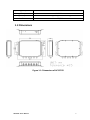
1.3 Dimensions……………………………………………………………………………………….6
1.4 Brief Description of ACS-2702……………………………………………………………7
Chapter 2
Hardware
2.1 Motherboard Introduction……..……………..…………………..………………..…..8
2.2 Specifications……………………………….……………………………..…………………...8
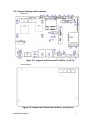
2.3 Jumpers Setting and Connectors…………..............................................12
Chapter 3
BIOS Setup
3.1 Operations after POST Screen.............................................................21
3.2 BIOS Setup Utility….............................................................................21
3.3 Main Settings…....................................................................................22
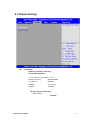
3.4 Advanced Settings...............................................................................23
3.5 Chipset Settings...................................................................................29
3.6 Boot Settings…....................................................................................32
3.7 Security Settings..................................................................................34
3.8 Save and Exit Settings.........................................................................35
Chapter 4
Installation of Drivers
4.1 Intel Chipset Driver.…………………………………………..…….………………………38
4.2 Intel Graphics Media Accelerator Driver………………....……….……………..41
4.3 Intel (R) Network Adapter……..………………………………….…………………….44
4.4 Realtek ALC662 HD Audio Driver Installation……………….…….……………46
Figures
Figure 1.1: Dimensions of ACS-2702…………....………………………………...……...6
Figure 1.2: Overview of ACS-2702……………………………………………….....……...7
Figure 2.1: Mainboard Dimensions……………………………..………………..………10
Figure 2.2: Jumpers and Connectors Location_ Board Top…………………....11
Figure 2.3: Jumpers and Connectors Location_ Board Bottom………………11
ACS-2702 User Manual
4