1
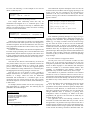
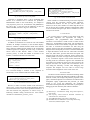
each test case file, a file under the same lexical name with the
suffix “_config” or “_constraints” can be used, as follows:
testcases> ls
tcTXsanity.sv
tcTXsanity_constraints.sv
tcLoopback.sv
tcLoopback_constraints.sv
Fig. 5: Test case constraint file structure
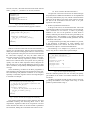
The contents of a constraint file may appear as follows:
class TcLoopback_cfg extends TcBase_cfg;
rand integer test_pkt_cnt;
[...]
constraint tcLpbck_cnstr {
test_pkt_cnt inside {[20:25]};
[...]
}
endclass;
Fig. 6: Example test case constraint file
With the constraint-related code structured and defined in a
specific, easy-to-find location, designers can be encouraged to
modify the code thus modifying the behavior of the test case
to their requirements. Designers need not learn and understand
the entire HVL language, but only the small subset of
keywords and syntax constructs related to defining constraints.
Like all other learning experiences, practice is needed.
However this reduced subset of keywords can be picked up
quickly, even with no HVL experience. Hence, designers can
start off using a test case and the debugging process by using
narrow constraints, and gradually widening them and get better
coverage.
Good commenting on behalf of the HVL programmer is
always helpful in describing the intent and function of the code.
The code dealing with parameter constraints is no exception,
especially if verification engineers want to encourage designers
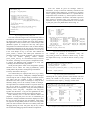
to use them. For example:
class TcLoopback_cfg extends TcBase_cfg;
// test_pkt_cnt: # of packets to lpbk’ed in DUT
rand integer test_pkt_cnt;
[...]
constraint tcLpbck_cnstr {
// cnstrnt of # of packets to be lbk’ed in DUT
test_pkt_cnt inside {[20:25]};
[...]
}
endclass;
Fig. 7: Test case constraints file with appropriate commenting
The practices mentioned above help designers feel more
comfortable tinkering and fine-tuning HVL code to their
requirements, regardless of their level of experience. The next
section describes how more can be done related to parameters
and constraints, making the environment more intuitive to use.
IV. EASY TO DEBUG WITH ENVIRONMENT
The practices in this section show how test bench messages
and presentation of additional information can be implemented
to be easily understood by any user, and aid in the autonomous
debugging of the design. Once again, these practices consider
the user of the environment will have little to no prior
experience with any HVL.
A. Feedback of Randomized Parameters
In the previous section, we discussed how HVL code could
be structured to make test case knobs easier to access and edit.
Once constraints are set however, a means of providing
feedback to the user on the generation of these knobs is
needed, confirming that desired results were generated by the
constraints solver. This feedback is very helpful, particularly
to designers new to constrained-random generation and the
related HVL code syntax.
A simple method of providing this feedback is to provide,
at the beginning of simulation, an easily readable, well
formatted printout of all relevant test bench and test case
knobs that are subject to constrained randomization.
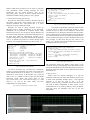
The following is an example of a printout of test case
knobs, using the above mentioned loopback example:
----------------------------------- Test Bench Configuration
----------------------------------Test Case:
---------Tx Packets to inject: 25
Tx Rate: 70 Mb/s
Max Packet Size:
1576
Min Packet Size:
64
[ ... ]
----------------------------------
Fig. 8: Test case configuration knob printing
With this formatted printout, the user can easily and quickly
get feedback on the results of constraints defined to the test
case knobs.
The HVL programmer should carefully construct the code,
providing this feedback. The example code in Fig. 9 would
produce a printout similar to Fig. 8: