1
Introduction to
Your Security
System
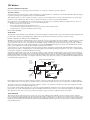
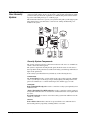
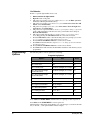
Your security system uses wireless technology to warn your family about intrusion,
carbon monoxide and fire. It may also be used to control lights and appliances within
your home. The system has the capabilities of communicating with a central monitoring station and sending messages to a numeric pager.
This manual describes how to operate your system. It will guide you through programming instructions for system features as well as basic arming and disarming commands for the system.
*
D O O R /W IN D O W
S E N S O R
K E Y C H A IN
T O U C H P A D
M O T IO N
S E N S O R
S M O K E
S E N S O R
S Y S T E M
S T A T U S
A R M
D o o rs &
W in d o w s
A R M
M o tio n
S e n s o rs
D o o r s & M o tio n
W in d o w s S e n s o r s
D IS A R M
2
A rm
3
1
1 / 2
5
4
7
8
S y s te m
S ta tu s
H
O
M
E
S E C U
9 / 0
7 / 8
C O
6
9
S p e c ia l
M o tio n
D o o rs
O n
R
I T Y
S Y S T E M
S T A T U S
D is a r m
5 / 6
3 / 4
T im e
S e n s o r
O n
A R M
D o o r s &
W in d o w s
D E
A R M
M o tio n
S e n so r s
O ff
H
O
M
E
C
O
N T R
O
E N
C Y
L
D IS A R M
O ff
C h im e
L ig h ts
E M
E R
G
E M E R G E N C Y - P r e s s & H o ld B o th K e y s
F IR E
R E M O T E H A N D H E L D
T O U C H P A D
P O L IC E
7
O n
3
*
H
O
M
A
N
I S
I
T
9
7
U N IT C O D E
A
T
O
5
1 1
F a n
9
X -1 0
A
C
K
I
C O N T IN U O U S
M O M E N T A R Y
G
H o ld B o th K e y s
2 -W a y R F
T O U C H P A D
S O U N D E R & R E L A Y
U N IV E R S A L
M O D U L E
*
I
C
E
K
G
L A M P
M O D U L E
7
9
A
M
E
K
5
O
C
M
S O U N D E R O N L Y
1 1
7
9
A
3
1 3
5
1 1
1
1 5
3
1 3
H O U S E C O D E
R E L A Y O N L Y
*
1
1 5
E
M
P O W E R H O U S E
O
R F E L E C T R O N IC
T H E R M O S T A T
O ff
0
O F F
1
1 5
1 3
M o d e
6
8
E M E R G E N C Y P r e ss &
O N
P r o g
>
3
5
4
A U X
T e s t W e e k ly
*
H o ld
<
2
1
*
I
G
A P P L IA N C E
M O D U L E
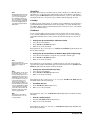
Security System Components
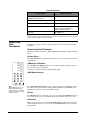
The security system uses devices called sensors that use radio waves to communicate
alarms to the Control Panel (panel).
The system is supervised, meaning that the panel checks the status of each sensor to
detect problems. If the panel detects trouble it will notify you with beeps and indicator
lights on the panel itself.
Your security system installation may include any of the following devices:
Control Panel
The Control Panel is used to operate and program your security system. It communicates to you through voice messages, beeps, and by lighting or flashing buttons. The
panel can communicate to a central monitoring station, numeric pager, or both.
Touchpads
Remote Handheld Touchpads are used to control the security system primarily from
within the home.
* Dialog Touchtalk 2-Way RF Touchpads are used to control the security system primarily from within the home. It’s used to hear commands from the control panel when
it’s active.
Keychain Touchpads are used to control the security system from within or near the
outside of your home.
Sensors
Indoor Motion Sensors detect motion in a protected indoor area. When motion is
detected the panel may respond by sounding chimes or an alarm.
Security Pro 1000
1