1
1. Introduction
ActiView PC and USB driver which support WIA and TWAIN standards.
After installing the USB driver and ActiView application, you can use the software to:
¾
Control the AV322.
¾
Capture and record images.
¾
Annotate images, highlight important details and save them for later use.
2. System requirement
Windows XP
MAC OS X
v10.4.10, v10.5
Windows Vista
z CPU: P4 2.8 GHz and above
z CPU: P4 2.8 GHz and above
z Memory: 512MB
z Memory: 1GB
z Support Direct X 9
z Support Direct X 9
z Resolution: 1024x768
z Resolution: 1024x768
z
z Minimum Hard Disc Space
z Minimum Hard Disc Space
z
Required: 100MB
z CPU: PowerPC G4 866MHz
Required: 100MB
z
z
or Intel Pentium® 1.83GHz
Intel Core 2 Duo processor
Memory: 512MB
1,024x768 screen resolution
and 24-bit color display
Minimum Hard Disc Space
Required: 1GB
QuickTime 7.4.5 above
3. Before install
3.1. Connect the power cord of the Visual Presenter.
3.2. Turn on the Visual Presenter.
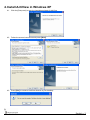
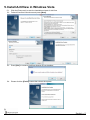
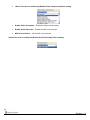
3.3. Connect USB cable to the Visual Presenter and your computer. Then, as shown below, the computer
will automatically detect new hardware.
3.4. Press Cancel to skip the [Found New Hardware]
English - 2