1
Gigaset 5040 / GB_IRL en / A30350-M211-L101-2-7619 / bigButton_en.fm / 28.02.2011
2
en
Proximity sensor
The proximity sensor detects when you approach the
telephone and lights up the keypad and display. A call is
automatically answered by speaking handsfree.
Prerequisite: the caller is stored under a Name key and
“Automatic call pick-up” is activated (see page 6).
Note: An automatically answered call is ended like any
other call in handsfree mode (see page 4).
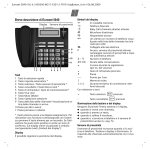
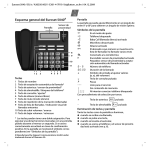
Important numbers under Name keys
For quick access to important numbers, you can save up
to 6 numbers under Name keys and label them accordingly (see page 5). The complete number must be stored
(including area code).
Easy to recognise incoming and missed calls
The Gigaset 5040 also indicates visually when you
receive a call:
◆ The Name key flashes if the caller is stored (see
page 5).
◆ The Calls list key flashes if the caller is not stored
under a Name key (see page 9).
◆ The calling number is shown in the display if Calling
Line Identification (CLI) is possible (see page 9).
You can also quickly access numbers which called in
your absence:
◆ The Name key is lit up if the caller is stored.
◆ The Calls list key is lit up if the caller is not stored
under a Name key. You can scroll through all missed
calls.
Safety precautions
When installing, connecting and operating the telephone, always observe the following precautions:
◆ Only use the plugs and leads supplied.
◆ Only connect the connecting lead to the socket/jack
provided for that purpose.
◆ Only connect approved accessories.
◆ Arrange the connecting lead where it will not cause
accidents.
◆ Position the telephone on a non-slip surface.
◆ For your safety and protection, the telephone must
not be used in bath or shower rooms (wet locations).
The telephone is not splash proof.
◆ Never expose the telephone to sources of heat, direct
sunlight or other electrical devices.
◆ Protect your telephone from moisture, dust, corrosive liquids and vapours.
◆ Never open up the telephone yourself.
◆ Do not touch the plug contact with pointed or metallic objects.
◆ Do not carry the telephone by the leads.
◆ If you give your Gigaset 5040 to someone else, make
sure you also give them the user guide.
All electrical and electronic products should be disposed of separately from the municipal waste stream
via designated collection facilities appointed by the
government or the local authorities.
This crossed-out wheeled bin symbol on the product means
the product is covered by the European Directive 2002/96/EC.
The correct disposal and separate collection of your old appliance will help prevent potential negative consequences for the
environment and human health. It is a precondition for reuse
and recycling of used electrical and electronic equipment.
For more detailed information about disposal of your old appliance, please contact your local council refuse centre or the
original supplier of the product.