1
G
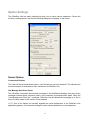
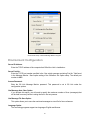
Switch Connection Type
Although OfficeServ Link provides three connection modes, the Samsung iDCS Key telephone
system is only supported using the TCP/IP Connection type.
y
TCP/IP connection mode: Uses LAN-based TCP/IP to connect
SIM / Serial Cable Parameters
This function is currently not supported
G
TCP/IP Parameters
The iDCS 100/R2 and iDCS 500/R2 Key telephone systems support LAN-based TCP/IP
communications. The environment settings for TCP/IP connections are as follows:
y
y
TCP/IP Address: Enter the LAN interface IP address of iDCS Key telephone system (See MMC 830
setting on the iDCS system)
Port No.: This setting is not configurable in the iDCS 100/R2 or iDCS 500/R2 at this time and should
not be changed. The default value is 5002.
Switch Type
Select the appropriate switch type
y
y
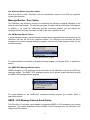
The “Normal Type” option is currently not being used.
Select OfficeServ Type when operating with the iDCS 500 Release 2 and iDCS 100 Release 2 key
telephone system.
Listen Port No. for Client Connections
As soon as a connection has been successfully established with the iDCS Key telephone system,
the OfficeServ Link starts a process used to receive requests from client connections. This value is
used to define the TCP/IP port number that will be used to listen for client requests. The value of this
setting is set to TCP/IP port “6000” by default. You can specify any TCP/IP port higher than 1024 if
necessary. TCP/IP ports 0 to 1023 have already been reserved in the OfficeServ Link.
Password for System Information
This field should match the EasySet option password set using MMC 841. The default value for this
field is “1234”.
G
17