1
Table of Contents
Table of Contents
1. How to use This Manual
Scope of this Manual
Using Microsoft® Windows®
EDS EZ Help
1-1
1-1
1-1
2. Installing EDS EZ
System Requirements
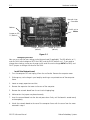
Hardware Installation
Software Installation
Configuring EDS EZ
2-1
2-1
2-4
2-5
3. An EDS EZ Overview
Starting EDS EZ
The Application Window
The Layout Window
3-1
3-2
3-3
4. Text Designs
The Text Tool
4-1
5. Working With Designs
Designs as Objects
Modifying Condensed Designs
Modifying Expanded Designs
Print
Using the Color Palette
5-1
5-7
5-9
5-10
5-10
6. Working With Files
Design Formats
Opening Designs
Importing Designs
Saving Designs
Exporting Designs
File Name Standards
6-1
6-2
6-3
6-4
6-5
6-6
i