1
Saving Designs
6-5
Object Files
An Object file contains information about multiple objects, each with its own separate instructions. For instance, you might combine into one Object file:
•
An Expanded design of a team mascot
•
A Condensed design of team member's name
Then, you can modify each object separately. You could rescale the name without altering the
mascot. Object file names have the extension OFM.
Auto Send Design Files
An Auto Send Design file is created by EDS EZ when transferring or sending files to a peripheral.
In addition to your design data, the file contains special instructions added by EDS EZ to help the
peripheral make a sewing recovery after a power failure. Auto Send Design files have the extension ASD.
ASD files are stored in the EDSEZ\ASD subdirectory. To prevent this directory from taking up too
much of your hard drive, delete old files periodically using the Windows File Manager. For more
information on how to use File Manager, consult your Windows User Manual.
Exporting Designs
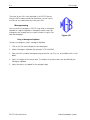
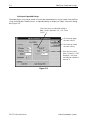
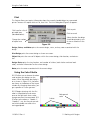
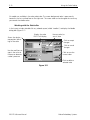
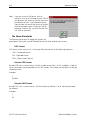
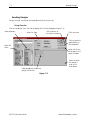
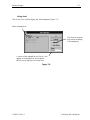
Click on File, then Export to display the Export dialog box (Figure 6-5).
Select the correct format
Select the correct device
Insert a disk
into the proper
drive, and click
to export
Enter name
of new file
Figure 6-5
110362-01 Rev. A
6. Working With Files