1
Chapter 1.0 Quick Reference
1.0 Quick Reference
The PowerSeries Neo Alarm System uses shortcut keys to access options or features on all models
of keypads. When using an LCD keypad, the PowerSeries Neo Alarm System additionally uses a
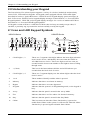
menu based navigation system. The scroll keys can be used to [Scroll] through the list of options contained within the current menu. For more information on keypads see 2 “Understanding your
Keypad Display”. Lookup detailed information on any of the listed actions using the accompanying
Section number.
For detailed information about the PowerSeries Neo Alarm System, refer to the full online manual,
with the following part #: 2900861R001, which can be accessed from the DSC.com Web site.
Note: Some features must be enabled by installer.
Note: Bypass Groups are not permitted in UL listed installations.
Note: [*] - If configured by installer
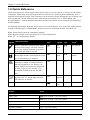
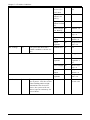
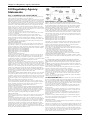
Status
Emergency Status Function Emergency
Function Keys
Lights
Keys
Lights Keys
Keys
Ready - Indicates system normal. Must
be on to arm system. All zones must be
secured or bypassed and the system disarmed for this light to activate.
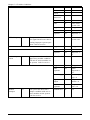
Stay
Arm
Fire Alarm
Armed- Indicates system is armed. If the
Ready light and the Armed light are both
on, an Exit Delay is in progress.
Away
Arm
Medical
Alarm
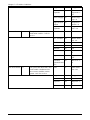
Trouble - On indicates a system malfunction or tamper. Flashing indicates
that the keypad has a low battery condition. Follow the instructions displayed
or enter [*][2] to view trouble. Correcting the trouble turns off the indicator.
Chime
Panic Alarm
AC Power - Indicates AC Power is
present. The AC Power light will turn
off when AC is absent.
Reset Sensors
Quick
Exit
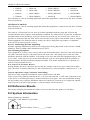
Action
Press
Arming and Disarming
Away Arm
Stay Arm
for 2 seconds + [Access Code*]
for 2 seconds + [Access Code*]
Night Arm
When armed in stay mode [*][1] + [Access Code*]
Disarm
[Access Code]
No-Entry Arming
[*][9] + [Access Code*]
-1-