1
TABLE OF CONTENTS
1
GETTING STARTED .......................................................................................................................... 3
1.1
1.2
1.3
1.4
1.5
SYMBOLS USED IN THIS MANUAL ................................................................................................... 3
MACHINE INFORMATION ................................................................................................................. 3
CONTACT INFORMATION ................................................................................................................. 3
SAFETY INFORMATION .................................................................................................................... 4
PACKING LIST ................................................................................................................................. 4
2
INTRODUCTION ................................................................................................................................ 5
3
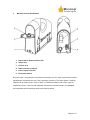
MACHINE FEATURES IDENTIFICATION ................................................................................... 6
4
ACCESSORIES .................................................................................................................................... 7
4.1
5
SET-UP OF THE ICC .......................................................................................................................... 7
5.1
5.2
5.3
6
ISLET CELL COUNTER DISH (ICC-DISH) ........................................................................................ 7
ICC CONNECTIONS .......................................................................................................................... 7
ISLET SAMPLE PREPARATION .......................................................................................................... 7
SAMPLE STAINING ........................................................................................................................... 9
USING THE ICC .................................................................................................................................10
6.1
POWER UP ......................................................................................................................................10
6.2
LOGIN .............................................................................................................................................10
6.3
SAMPLE PREPARATION ...................................................................................................................11
6.4
SAMPLE INFO..................................................................................................................................12
6.5
SAMPLE ANALYSIS .........................................................................................................................13
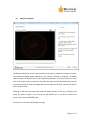
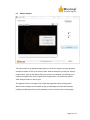
The main function of the Sample Analysis page is to check the sample is properly prepared and that
the uptake of DTZ by the islets is stable. Start the Analysis by clicking the “Analyze Image” button. A
pop up will appear letting you know the time elapsed, and allowing you to cancel the analysis at any
time. Analysis can be skipped at the user’s discretion with the “SKIP Analysis” button on the top
right. ......................................................................................................................................................13
The application looks for changes in the image that signal that staining is taking place. Whenever this
changes become stable the pop up will disappear and the LED indicators (Lighting and Staining) will
turn Green allowing the user to continue to the Counting page. ...........................................................13
6.6
COUNTING ......................................................................................................................................14
6.7
REPORT ..........................................................................................................................................15
7
CUSTOMER SERVICE .....................................................................................................................17
Page 2 of 17