1
Table of Contents
Welcome............................................................................................................................4
NEW Switched-On Schoolhouse 2012 Features...............................................................5
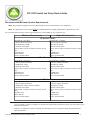
Recommended System Requirements..............................................................................6
Installing Switched-On Schoolhouse 2012........................................................................7
Attention Netbook Users...............................................................................................7
Types of Installs............................................................................................................7
Home Edition Full Install...............................................................................................8
Home Edition Client Install..........................................................................................12
Upgrading to 2012......................................................................................................15
2011 to 2012....................................................................................................................15
2010 to 2012....................................................................................................................15
Upgrading From Earlier Versions.....................................................................................17
Removing (Uninstalling) SOS 2012.................................................................................17
Setting Up Switched-On Schoolhouse 2012....................................................................18
Making the Most of Your SOS Setup........................................................................18
Logging In.................................................................................................................19
Product Registration.................................................................................................19
Setup Wizard............................................................................................................21
Ready to Begin?..................................................................................................21
Creating a Calendar.............................................................................................22
Customizing a Calendar.......................................................................................23
Viewing a Calendar..............................................................................................23
Adding Students...................................................................................................24
Installing Subjects................................................................................................25
Assigning Subjects...............................................................................................25
Sample Lesson....................................................................................................26
SOS Setup Completion / Home Page . ......................................................................27
Help Resources...............................................................................................................28
Exiting SOS.....................................................................................................................28
Activities Away from the Computer..................................................................................29
Tutorials...........................................................................................................................30
Overview Presentation.....................................................................................................31
EULA................................................................................................................................32
Resetting Your Teacher Password...................................................................................40
Resource List...................................................................................................................41
SOS 2009 Home Ediition Install and Setup Basics Guide• 3