1
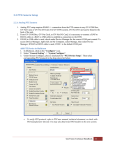
6. Click on the “Configure” icon. 7. Select “General Setting” -> “System Configure”. 8. Under System Configure, place a checkmark by “PTZ Device Setup”. Then select corresponding PTZ protocol in the drop-down list. 9. Click on “PTZ Setup” button. 10. Check on “Active”. 11. Select “COM Port” for which the PTZ camera is connected through (refer to 2.2.1 step 3), and then select “Baud Rate” that matches the PTZ baud rate. 12. Click “OK”. To verify PTZ baud rate, refer to PTZ manufacturer user manual for options. It is typically setup via dipswitches on the PTZ camera. 13. Repeat above steps to add multiple PTZs using different protocols and COM ports. GeoVision Technical Handbook 14