1
You can process Stock Loan Returns by using the appropriate Reason Codes via the PTS functions
DO or NDOM. All stock loan returns are delivered from the borrower's Free account.
1 Enter Reason Code 20 in the REAS field of the SDFS Initial Public Offering Deliver Orders Screen.
2 Refer to DO and NDOM for additional Deliver Order field and processing information.
Stock Loan Return Receipts
All Stock Loan Returns are delivered to the lender's Free Account as Free Secondary Market shares
in the IPO database.
Pledges
Pledges of Collateral
You can pledge shares with or without value from either their IPO Control or Free Accounts via the
PTS function COLL.
1 Enter the following information on the Free Pledge Service Screen:
•
•
IPO: enter Y if the shares are being pledged from the IPO Control Account
OR
Enter N if the shares are being pledged from the Free Account.
2 Refer to COLL for additional field and processing information.
Pledged IPO Control and Free Account shares are moved to the Pledge (14) Account. IPO shares are
segregated in the I14 Account.
Pledge Releases
If released during the tracking period, Pledge shares are delivered back to their original accounts. In
cases where both IPO and Secondary Market shares were pledged, released (Free) shares are
returned to the Free Account first, up to the quantity of Free Account shares pledged. The balance
of the shares return to the IPO Control Account.
If released after tracking has ended, all Pledge shares are delivered to the Free Account regardless
of what their account of origin.
Reclaims
Reclaim Deliveries
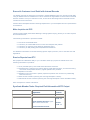
DTC will automatically process a matched reclamation based on the DO transaction number and
other transaction information provided until one day after settlement.
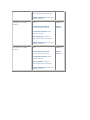
You can enter Matched Reclaims via the PTS functions ART and DO/NDOM and via CCF, CCFII and
MDH.
When you reclaim a delivery, the reclaimed DO will be matched to the original delivery and the
information in the IPO database will be reversed.