1
Accessory 24E2S
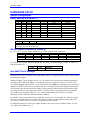
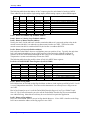
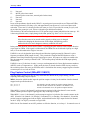
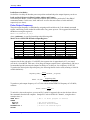
MI912 determines which signal or combination of signals, and which polarity, triggers a position capture
of the counter for the encoder mapped to the specified node. If a flag input (home, limit, or user) is used,
MI913 for the node determines which flag. Proper setup of this variable is essential for a successful home
search, which depends on the position-capture function. The following settings may be used:
0:
Capture under software control (armed)
1:
Capture on Index (CHCn) high
2:
Capture on Flag high
3:
Capture on (Index high AND Flag high)
4:
Capture under software control (latched)
5:
Capture on Index (CHCn) low
6:
Capture on Flag high
7:
Capture on (Index low AND Flag high)
8:
Capture under software control (armed)
9:
Capture on Index (CHCn) high
10:
Capture on Flag low
11:
Capture on (Index high AND Flag low)
12:
Capture under software control (latched)
13:
Capture on Index (CHCn) low
14:
Capture on Flag low
15:
Capture on (Index low AND Flag low)
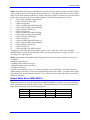
The trigger is armed when the position capture register is read. After this, as soon as the Compact
MACRO Station sees that the specified input lines are in the specified states, the trigger will occur — it is
level-trigger, not edge-triggered.
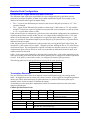
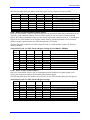
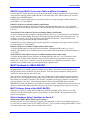
MI913 parameter determines which of the Flag inputs will be used for position capture (if one is used —
see MI912):
0: HMFLn (Home Flag n)
1: PLIMn (Positive End Limit Flag n)
2: MLIMn (Negative End Limit Flag n)
3: USERn (User Flag n)
Typically, this parameter is set to 0 or 3, because in actual use, the LIMn flags create other effects that
usually interfere with what is trying to be accomplished by the position capture. To capture on the LIMn
flags, disable their normal functions with Ix25, or use a channel n where none of the flags is used for the
normal axis functions.
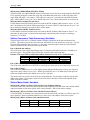
Output Mode Select (MSn,MI916)
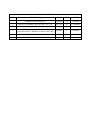
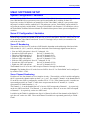
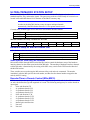
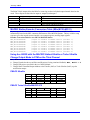
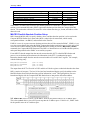
The Acc-24E2 family of boards can be used for multiple mode outputs. At the MACRO Station, the
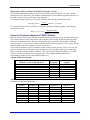
output mode must be set up on MACRO Station variable MSn,MI916. The table below shows the output
modes available for each of the Acc-24E2 boards. The output mode select will be set up automatically if
using either the P2Setup or the Turbo Setup programs.
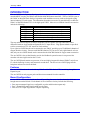
22
Board
Direct PWM Mode
DAC Mode
Pulse and Direction
Acc-24E2
Acc-24E2A
Acc-24E2S
Yes
No
No
No
Yes
No
Yes
Yes
Yes
Ultralite/MACRO Station Setup