1
Kramer Protocol 2000
10
Kramer Protocol 2000
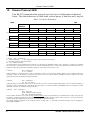
This RS-232 communication protocol uses four bytes of information as defined
below. The default data rate is 9600 baud, with no parity, 8 data bits and 1 stop bit.
Table 5: Protocol Definitions
MSB
LSB
DESTINATION
INSTRUCTION
0
D
N5
N4
N3
N2
N1
N0
7
6
5
4
3
2
1
0
1st byte
INPUT
1
6
I5
I4
I3
I2
I1
I0
7
6
5
4
3
2
1
0
2nd byte
OUTPUT
1
O6
O5
O4
O3
O2
O1
O0
7
6
5
4
3
2
1
0
1
OVR
X
M4
M3
M2
M1
M0
7
6
5
4
3
2
1
0
3rd byte
MACHINE NUMBER
4th byte
1st BYTE:
Bit 7 – Defined as 0
D – “DESTINATION”:
0 - for sending information to the switchers (from the PC);
1 - for sending to the PC (from the switcher)
N5 N0 – “INSTRUCTION”
The function that is to be performed by the switcher(s) is defined by the INSTRUCTION (6 bits) Similarly, if a function is performed
via the machine’s keyboard, then these bits are set with the INSTRUCTION NO , which was performed The instruction codes are
defined according to the table below (INSTRUCTION NO is the value to be set for N5 N0)
2nd BYTE:
Bit 7 – Defined as 1
I6 I0 – “INPUT”
When switching (ie instruction codes 1 and 2), the INPUT (7 bits) is set as the input number which is to be switched Similarly, if
switching is done via the machine’s front-panel, then these bits are set with the INPUT NUMBER which was switched For other
operations, these bits are defined according to the table
3rd BYTE:
Bit 7 – Defined as 1
O6 O0 – “OUTPUT”
When switching (ie instruction codes 1 and 2), the OUTPUT (7 bits) is set as the output number which is to be switched Similarly, if
switching is done via the machine’s front-panel, then these bits are set with the OUTPUT NUMBER which was switched For other
operations, these bits are defined according to the table
4th BYTE:
Bit 7 – Defined as 1
Bit 5 – Don’t care
OVR – Machine number override
M4 M0 – MACHINE NUMBER
Used to address machines in a system via their machine numbers When several machines are controlled from a single serial port, they
are usually configured together with each machine having an individual machine number If the OVR bit is set, then all machine
numbers will accept (implement) the command, and the addressed machine will reply
For a single machine controlled via the serial port, always set M4 M0 = 1, and make sure that the machine itself is configured as
MACHINE NUMBER = 1
18
KRAMER: SIMPLE CREATIVE TECHNOLOGY