1
A tutorial: Creating and analyzing a simple model
• ‘‘Creating a material,’’ Section 2.5
• ‘‘Defining and assigning section properties,’’ Section 2.6
• ‘‘Assembling the model,’’ Section 2.7
• ‘‘Defining your analysis steps,’’ Section 2.8
• ‘‘Applying a boundary condition and a load to the model,’’ Section 2.9
• ‘‘Meshing the model,’’ Section 2.10
• ‘‘Creating and submitting an analysis job,’’ Section 2.11
• ‘‘Viewing the results of your analysis,’’ Section 2.12
2.1 Understanding ABAQUS/CAE modules
ABAQUS/CAE is divided into modules, where each module defines an aspect of the modeling process;
for example, defining the geometry, defining material properties, and generating a mesh. As you move
from module to module, each module contributes keywords, parameters, and data to form an input file
that you submit to the ABAQUS/Standard or ABAQUS/Explicit solver for analysis. For example, you use
the Property module to define material and section properties and the Step module to choose an analysis
procedure; the ABAQUS/CAE postprocessor is called the Visualization module.
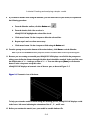
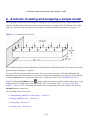
You enter a module by selecting it from the Module list under the toolbar, as shown in Figure 2−2.
Figure 2−2 Selecting a module.
2−2