1
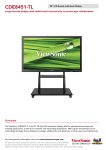
With multi point simultaneous touch technology this
large-panel display encourages group interaction.
Great for interesting group activities, two or three
users can simultaneously write or draw on the
display’s surface at the same time! And its superior
touch report rate provides a smoother user touch
experience for both educational and corporate
applications.
We’ve pre-installed our simple and easy-to-use
ViewBoard software on all of our ViewBoard series.
With various tool bar options that allow you to
write, draw, save and share, the presenters can
better highlight the contents. It also features screen
recording, magnifier and spotlight features that
make office presentations, in-classroom and
distance education learning more productive,
interactive and efficient.
ViewBoard: Optimized Windows 8 interactive solution
Edge Boarder design improves
Windows 8 touch experience
With the unique edge border design that redefines
the relationship between the bezel and panel, in
particular operating under Windows 8, there are no
more dead angles. This design provides an
improved user touch experience, and with an easy
pull out charm bar, the presenters can operate all
Windows 8 functions more efficiently and
productively.
A wider range of accessible application
for education and business
Windows®8 operating system for a
better interactive experience
The Windows 8 and MS Office software make it
great for office and school use for any sort of
presentations. The built-in browser enables the
presenters to show content directly from the
Internet. Windows 8 creates great interactive
experience that helps to share and upload data,
connect and collaborate, and even create
presentations, which largely improve overall
efficiency and productivity.
Packing powerful intel processors
SWB6552