1
PhUSE 2013
Programmers are most interested in the audit trail of program development accessed through the SVN commit
history. When using Apache server, SVN administrators and support staff can take advantage of additional logging
for trouble shooting and debugging. Apache’s error_log captures any errors encountered when serving SVN
requests. An additional CustomLog should be configured to capture all access requests to SVN repositories. This
highly customizable access_log records every request to SVN repositories and may also interest your QA
department.
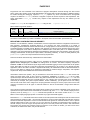
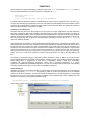
A simple CustomLog can be configured in httpd.conf using the line:
LogFormat "%h %u %t %r
Which results in log entries similar to:
%h
Remote
host
%u
User
10.1.123.456
twilliams
[30/Jan/2013:12:20:32 +0100]
CHECKOUT /<repoPath>/<product>/<study>/<analysis>/dev/adam/ad_pe.sas HTTP/1.1
10.1.321.654
jsmith
[02/Feb/2013:09:14:06 +0100]
PUT /<repoPath>/<product>/<study>/<analysis>/dev/validate/adam/v_ad_pe.sas HTTP/1.1
%t
Time
%r
First line of request
The full list of customizable log content is available in the Apache online documentation (see References).
REPOSITORY CONFIGURATION AND SECURITY
Decisions on IT architecture, validation considerations, and user requirements will drive configuration choices for the
SVN repository. Programmers employed directly by your company may work concurrently on a number of
investigatory products. External contract staff often focus on a single product. In this scenario each product is setup in
a separate repository for flexible security. Mirroring each repository to a fail-over server provides rapid recovery in the
event of catastrophic server failure. Development of validated macro code takes place in an isolated repository,
restricted to only those programmers developing and releasing this protected code. This repository, along with one for
managing administration of SVN (hook scripts, utilities, and training materials), is under an entirely different path
(SVNParentPath) due to its unique functional and security requirements.
There are two facets to SVN security: authentication and authorization.
Authentication answers the question, “Who are you?” Integration of SVN authentication with Active Directory using
Apache server, mod_dav_svn, and LDAP is a leading choice to consider. The added complexity compared to
svnserve + LDAP is counter balanced by the large benefit of detailed logging for each request made to the Apache
server. With LDAP our staff rely on the same username and password they use for login to our network and other
applications, without the need to maintain a separate SVN identity. AD authentication frees the SVN administrator to
focus on other tasks by making the IT department responsible for password length, composition, and expiration
requirements. Setup of AD authentication is well worth the extra effort.
Authorization answers the question, “Are you authorized to access this resource?” SVN access files contain user
names and paths which grant or deny access to repositories. Establishing a common access file for similar
repositories helps minimize maintenance. When using AD for authentication the usernames in the access file must
match with those entered by the user at a SVN prompt. If your company does not enforce the use of standardized
usernames (for example, one system requires ‘twilliams’, another “TWilliams”), you will spend a lot of time chasing
down access issues when users change their company password and forget to use the proper case for their SVN
username. Consistent use of all upper or lowercase letters for SVN is recommended if usage varies within the
company.
Use of AD and consistent usernames has another benefit. If training is recorded in a database, those records can be
queried with a script to add the list of trained staff to a versioned copy of the access file. The file is deployed on the
repository server by running a svn export command that specifies the new revision number of the access file.
PERL or other scripting languages provide a convenient way to glue these tasks together.
Paths listed in access files further refine which teams can access specific trials and analyses and can restrict access
during breaking of treatment codes. I recommend configuring a group for internal staff that has read-write access to
all active clinical trials repositories. Access for external staff can be granted to individual studies or even to specific
analysis folders within a study. The lower you go in the structure, the greater the maintenance effort. Granting an
external company access at a higher level (at the study level or even the product level) results in less maintenance
but provides more access than necessary. Base your decision on the number of studies, your level of trust in the
contractors, the maintenance effort, and your risk tolerance.
3