1
Contents
Contents
1
2
3
4
4.1
4.2
5
6
7
Introduction
Getting Started
Overview
Your RC-2C/RC-2
The RS-232 PINOUT
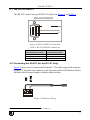
Connecting the IR-OUT (for the RC-2C Only)
Installing the Configuration Software
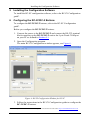
Configuring the RC-2C/RC-2 Buttons
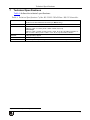
Technical Specifications
1
1
1
2
5
5
6
6
7
Figures
Figure 1: RC-2/RC-2C for Europe and the United States
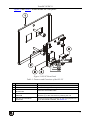
Figure 2: RC-2C Rear Panel
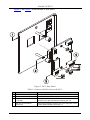
Figure 3: RC-2 Rear Panel
Figure 4: RS-232 PINOUT Connection
Figure 5: IR Emitter Wiring
Figure 6: RC-SV Configuration Window for RC-2C
2
3
4
5
5
6
Tables
Table 1: Features and Functions of the RC-2C
Table 2: Features and Functions of the RC-2
Table 3: RS-232 PINOUT Connection
Table 4: Technical Specifications of the RC-2C/RC-2 Wall Plate / RS-232 Controller
3
4
5
7
i