1
EXPLOY1165_RemoteCardEN.qxd
8/10/06
3:49 PM
Page 2
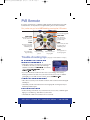
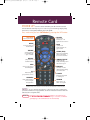
PVR Remote
If you have a PVR remote, you will have additional buttons and features beyond the
standard remote. For any buttons not explained here, please see the User Manual.
First, make sure you’re in SAT Mode by pressing the SAT button.
PVR
Lists recorded programs
SKIP FWD
SKIP BACK
Skips forward 30
seconds (recorded
programs only)
Skips back 10 seconds
of a recorded or live
program
FWD
BACK
Fast forwards (recorded
programs only) at
4 different speeds
Fast reverses recorded
or live programs at
4 different speeds
STOP
Stops playback or
stops recording
PLAY
RECORD
PAUSE
Displays recording
options
Pauses a recorded or
live program
Trouble-shooting tips
Starts playback of a
recorded program
(see page 11 in the Guide for more tips)
Some channels in the EPG have a red/green
background and I can’t access them:
• Verify that you have a subscription. If you don’t and
would like to subscribe, you can order it through
(if available),
Channels on Demand on
, or call
online at
to order.
channel 188
www.bell.ca/SelfCare
1 888 SKY-DISH
• If you are a subscriber, but still don’t have access, try resetting your receiver by
holding down the Power button on your receiver for about 8 seconds, or until the
green light goes out. If this doesn’t correct it, please call
.
The strength of my signal keeps fluctuating:
1 888 SKY-DISH
• This could be caused by severe weather conditions. Wait out the storm and the signal
will improve.
• Check that your dish is unobstructed for a clear signal path. Growing trees may be
interfering with the signal.
I have no audio on any channel:
• Hold down the power button on your receiver for about 8 seconds, or until the green
light goes out. Then let go. This will reset your receiver.
• Check that the volume is not turned down or set to mute.
NEED HELP? Channel 188 • www.bell.ca/SelfCare • 1 888 SKY-DISH