1
Barco projectors:
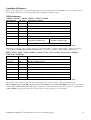
BR6300 (and friends)
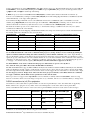
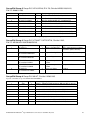
Barco have a wide range of CRT three-gun projectors and more recently the 6300 model, which is LCD, and a range of DLP
units as well. The manual R5975236_08 is the same for all these. They all seem to have identical control RS232 codes, so
probably most Barco units will work with the T460 driver by selecting Barco 6300 in the projector setting menu.
Projectors with same codes mentioned in the file R5975236_08 are BD2100, BD3000, BD3100, BD3200, BD3300,
BD5000, BD5100, BD8000, BD8100, BG8200, BG9200.
(Some models do not appear to have audio facilities in the projector, although the tested BR6300 does.)
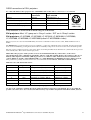
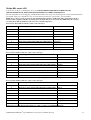
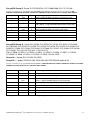
What connections are made to inputs depends on input boards plugged into slots in the front of the projector, and when that
slot is functional, a box on the projected image identifies the input card and slot number quite clearly. Unused slots are also
indicated when selected. So when setting up, run through the available channels and name them appropriately in the “source”
selection setup screen.
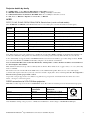
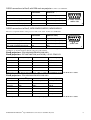
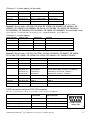
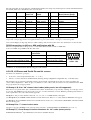
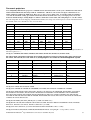
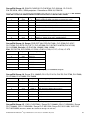
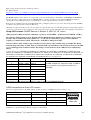
Communications runs at 9600 8N1.
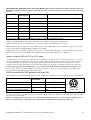
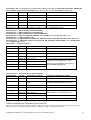
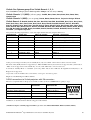
th
T460 Channel
Code, 4 byte
Slot
Screen display
Channel 1
01h
1
Depends on plug-in
Channel 2
02h
2
Depends on plug-in
Channel 3
03h
3
Depends on plug-in
Channel 4
04h
4
Depends on plug-in
Channel 5
05h
5
Depends on plug-in
Channel 6
05h
6
Depends on plug-in
Channel 7
07h
7
Depends on plug-in
Channel 8
08h
8
Depends on plug-in
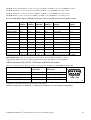
Don’t forget to set all unused T460 channels to “Skip” to jump over blank/unused inputs in all the above tables.
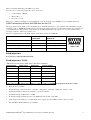
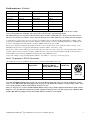
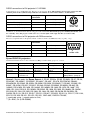
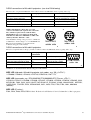
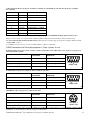
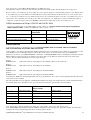
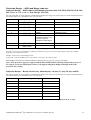
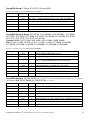
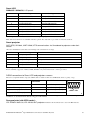
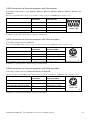
RS232 Connection for Barco
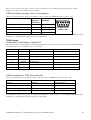
We don’t have a specific connection diagram for these Barco projectors, but one tested projector has a DB9 Male on the
projector. Only TX, RX and Ground were used for the test. (CTS was NOT needed). We assume this is the same for other
models. Use a multimeter to determine the TX connection (-9 volts) and connect to the RX in of the T460 (J6 Pin 3). Use
multimeter with the projector OFF in “resistance” mode and look for another line with approximately 5k ohm to ground, and
assume this is the projector RS232 input and connect to J6 pin 2 of the T460.
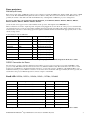
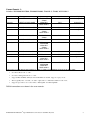
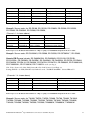
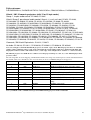
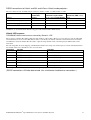
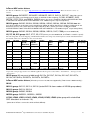
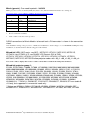
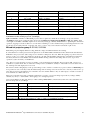
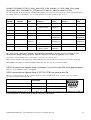
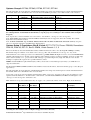
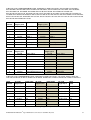
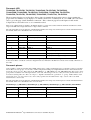
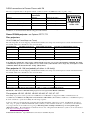
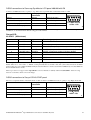
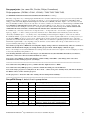
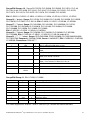
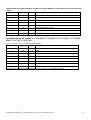
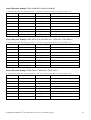
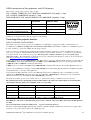
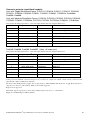
BenQ LCD: RP550+, RP551+, RP650+, RP651+, RP700+, RP840G
T460 Channel
Code string
Connector
Screen display
Channel 1
'801s', 22H, '000', 00DH
DB15
VGA
Channel 2
'801s', 22H, '006', 00DH
DVI
DVI
Channel 3
'801s', 22H, '003', 00DH
Video
AV
Channel 4
'801s', 22H, '001', 00DH
HDMI
HDMI 1
Channel 5
'801s', 22H, '002', 00DH
HDMI
HDMI 2
Channel 6
'801s', 22H, '007', 00DH
DisplayPort
DisplayPort
Channel 7
'801s', 22H, '008', 00DH (if FLAGJ=0)
USB-A
MultiMedia
Channel 7
'801s', 22H, '009', 00DH (if FLAGJ=1)
BNC
SPI
Channel 8
'801s', 22H, '010', 00DH
RJ45
NETWORK
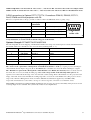
Don’t forget to set all unused T460 channels to “Skip” to jump over blank/unused inputs in all the above tables.
T460/461/T462 Manual 9th Sept 2015 Part B 3.84 release © Jed Micro Pty Ltd
3