1
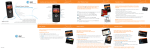
Getting to Know Your Phone
For more details, visit att.com/DeviceSupport.
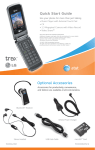
Speakerphone
Key
Headset/USB/
Charging Port Left
Soft
Key
Camera
PTT Key*
Multitasking
Key
Send Key
Volume
Up/Down
Clear
& Back
Key
microSD™
Port
Right
Soft
Key
OK/Web Key
Camera Key
Power/End
Key
Navigation
Key
Voice
Record
Key
* See Push to Talk insert for more details.
Play Music
Listen to music from your favorite artists right
on your phone. To listen to music that you
have transferred to your phone, follow these
quick and easy steps:
1. Press left on the Navigation Key, select
AT&T Music (3), then Music Player (1).
2. Select All Songs (1), Playlists (2), Artists (3),
Albums (4), or Genres (5).
3. Press
to play/pause. Press up or down on
the Navigation Key to adjust the volume, and
left or right to go to the previous or next song.
4. Press the Left Soft Key for Minimize to
access other phone functionality while music
is playing.