1
E.F.C.
Secmatic-970 Installation and user's Manual
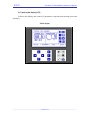
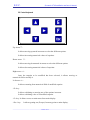
2.2 Control keyboard
Up Arrow × :
It allows moving upwards in menus to select the different options.
It allows increasing numerical values of setpoints.
Down arrow Ø :
It allows moving downwards in menus to select the different options
It allows decreasing numerical values of setpoints.
Right arrow Ö :
Once the setpoint to be modified has been selected, it allows moving to
numerical field to modify it.
Left arrow Õ :
It allows returning from numerical field of modified setpoint.
<E> key :
It allows validating or entering one of the options in menus.
It allows validating value of a modified setpoint.
<F> key: It allows access to main menu from main display.
<Esc> key:
It allows getting out (Escape) from any point to main display.
_____________________________________________________________________________________
16 out of 71