1
Check the Components
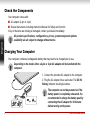
Your computer comes with:
■ AC adaptor (2-pin or 3-pin)
■ Several documents, including Instruction Manual for Safety and Comfort.
If any of the items are missing or damaged, contact your dealer immediately.
English
All product specifications, configurations, prices, system/component/options
availability are all subject to change without notice.
Charging Your Computer
Your computer contains a rechargeable battery that may need to be charged prior to use.
Depending on the model, either a 2-pin or 3-pin AC adaptor will be bundled with the
computer.
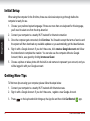
1. Connect the provided AC adaptor to the computer.
2. Plug the AC adaptor into a wall outlet. The DC IN/
Battery indicator should glow amber.
2pin
2pin
2
3pin
3pin
The computer can not be powered on if the
battery power is completely exhausted. It is
recommended to charge the battery pack by
connecting the AC adaptor for 30 minutes
before turning on the power.
User Information Guide